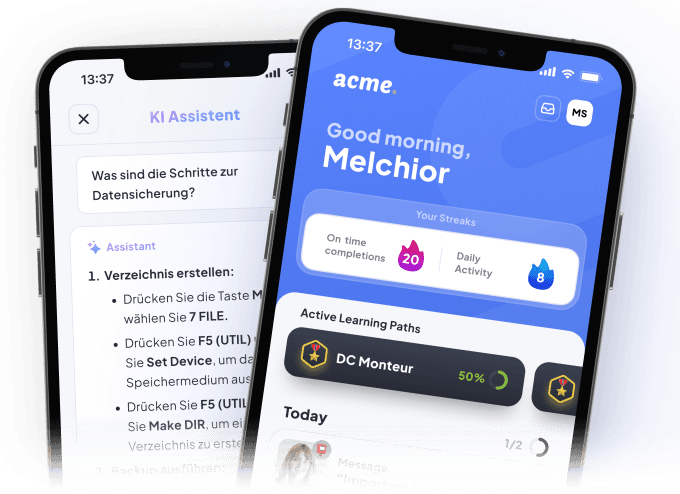
LMS for Businesses with Agentic Intelligence.
All in one platform: With Elephant’s LMS software, you can create courses, learning paths, and seminars, organize teams, and track progress. AI agents handle tasks related to content, administration, and reporting.
- Microlearning
- Blended learning paths
- Gamification
- Knowledge checks
- Seminars
Agents handle routine tasks in the LMS software
Three specialized agents work within the enterprise LMS and handle tasks that would otherwise have to be done manually. Ellie creates courses directly from your documents and automatically updates existing content as soon as the source changes. The Analytics Agent monitors LMS data, identifies outdated content and knowledge gaps, and suggests improvements. The LMS Agent functions as a conversational admin copilot: creating learners, adjusting assignments, managing tags, and scheduling exams. All via chat, without any manual clicking.
| AI agent | Task | Typical inputs | Result in the LMS |
|---|---|---|---|
| Ellie Content Agent | Creates and updates e-learning courses | SOPs, manuals, training materials, policies | Course modules, quiz questions and learning paths that update automatically when the source changes |
| Analytics Agent | Analyzes LMS data and learning content | Course completions, feedback, assessment results and usage data | Knowledge gaps, outdated content and concrete improvement suggestions |
| LMS Agent | Supports admins with routine LMS tasks | Learners, teams, tags, assignments, exams | Administrative changes to users, assignments, tags and exams via chat |
Content Management for E-Learning
In Elephant’s Learning Management System, you can centrally create and manage courses, learning paths, seminars, and assessments. You can organize content by teams, roles, locations, or tags, and assign it specifically as mandatory training or optional learning opportunities.
 Hi, I'm Ellie!
Agentic content creation and automatic updates with Ellie
Ellie is Elephant's AI agent for content. Upload a document—an SOP, a manual, or a training guide—and Ellie will turn it into a ready-to-use e-learning course in the LMS software. If the source changes, Ellie automatically updates the course content. No manual updates, no outdated learning materials.


Standard Content Hub for Compliance Training
Ready-to-use compliance content for your company's LMS helps teams with training on data protection, onboarding, security, and other topics.
Easy Content Management in the Library
In the Library of Elephant's learning management system, you can centrally organize courses, learning paths, and documents and structure them using Spaces and drag-and-drop.
Blended learning management with seminar tools
For e-learning in Elephant's LMS software, you can combine self-service courses and live seminars into a single learning journey. You manage dates, locations, and enrollment all within a single workflow.
Learning Path Editor for Structured Learning Journeys
With the drag-and-drop Section Builder, you can create structured learning paths for your company within the LMS and arrange courses, assessments, and live training sessions in any order you choose.
Dynamic Assignments in the Enterprise LMS
Content is assigned based on teams and tags, using AND/OR logic to target specific audiences. New employees automatically gain access to all content relevant to their team.
Translator role for localization
Our learning management system for businesses automatically translates course content into 105+ languages. A translator review ensures that subject-specific terms are translated correctly.
Using Feedback to Improve E-Learning Content
Learners can provide feedback on individual modules directly within the app. This feedback is sent directly to the content creators in the Hub, allowing them to continuously improve the content.
Effortless assignment management
Content can be assigned as required or optional in the LMS software, with a due date in days for each assignment. This allows administrators to keep track of everything without having to manually monitor each assignment.
Glossary for Consistent Translations
A central glossary ensures consistent translations across all e-learning courses. Terms can be maintained manually or imported via CSV.
Auto-updating content with AI
The Analytics Agent automatically identifies outdated content and suggests targeted updates. This keeps the learning materials up to date without anyone having to manually review the entire content.
User Management in the LMS for Businesses
Elephant's user management system maps teams, roles, locations, and permissions to match the company's organizational structure. User data is automatically synchronized via HRIS integrations, CSV imports, or API connections, and learners are assigned to the appropriate courses, learning paths, and mandatory training sessions.
Model every team structure with tags and subteams
You can clearly map field service teams, locations, or roles in the LMS using tags and subteams—with AND/OR logic for dynamic assignments to the appropriate target groups.
HRIS Integration for Automatic User Synchronization
Using HRIS integrations, you can automatically import and sync users with the LMS software—for example, from Workday, BambooHR, Personio, Rippling, and more than 60 other systems.




Manage Roles and Permissions in the LMS
Editor, Admin, Viewer, or Translator—you can assign these permissions specifically to individual teams and departments. This allows you to manage permissions in a granular way without the hassle of spreadsheets.
CSV Import for User Data
You can upload lists of people—including their names, positions, and experience—to your company's LMS using drag-and-drop. This allows you to quickly import user data and use it for teams, roles, and assignments.
SSO for Easy Login to the LMS
Elephant's LMS software supports single sign-on via SAML 2.0 and OAuth 2.0. Your teams can log in using their usual credentials without having to manage separate passwords.
Scoped Access
Permissions can be restricted to specific teams or spaces, so that each group sees only what is relevant to them. This reduces information overload and protects sensitive content.
Auto-Inclusion for New Learners
New learners are automatically added to all applicable assignments in the LMS as soon as they are assigned to the correct team or tag. No manual updates are required when onboarding new employees.
| Feature | Purpose in the company | Implementation in Elephant |
|---|---|---|
| Team structures | Organize learners by team, location or function | Tags, subteams and AND/OR logic |
| HRIS integration | Sync user data with the LMS automatically | Connections to Workday, BambooHR, Personio, Rippling and 60+ more systems |
| Roles and permissions | Control access and editing rights precisely | Editor, admin, viewer and translator roles per team and area |
| CSV import | Bulk-transfer people lists into the LMS | Drag-and-drop upload of names, positions and further user data |
| Single sign-on | Simplify sign-in for employees | SSO via SAML 2.0 and OAuth 2.0 with existing credentials |
| Scoped access control | Expose content and information only to relevant groups | Restrict permissions to individual teams or spaces |
| Auto-inclusion | Assign new employees to matching learning content automatically | Inclusion in assignments based on teams and tags |
LMS Reporting within the Company
The reporting feature displays learning progress, course completions, overdue mandatory training, certificates, assessment results, and usage data at the team and learner levels. In the LMS software, you can filter and export reports or analyze the data in BI tools via the SQL API.
Agentic Report Builder for Custom LMS Reports
Ellie is your virtual content creator and helps everyone in the company generate reports and spreadsheets using prompts. This allows you to request customized analyses without having to create spreadsheets manually.
AI Assistant Analytics for Answer Coverage and Knowledge Gaps
In our enterprise LMS, the AI Assistant Analytics shows how many questions are asked, what the daily response rate is, and where the AI assistant is unable to provide a sufficient answer. This helps you identify knowledge gaps and determine where content should be improved or expanded.
Simple Overview of Teams with Key Performance Indicators
KPI Tiles show you the completion, overdue, and mandatory course statuses across your teams at a glance. This gives you a concise overview of learning progress, overdue tasks, and the status of mandatory courses.
CSV Export for Filtered Learner Data
In the enterprise LMS, learner data can be exported after filtering by date or time period. This allows you to prepare reports for external stakeholders or transfer the data to your own analytics tools.
Certificate Overview for Compliance and Audits
The LMS software lets you see at a glance who holds which certificate, when it expires, and whether it’s due for renewal. Ideal for compliance documentation and audit preparation.
Stay in touch with your teams right within the LMS
Messages, surveys, and feedback are all consolidated directly within your company’s LMS and the app. This allows you to reach learners in one place, gather feedback, and centralize all communication related to training in one location.
Create multilingual messages using rich text
With the rich-text editor, you can create messages with attachments, images, and videos right within your company's LMS—automatically translated into 105+ languages.
From October 1 we install the new series. Please complete the course Installation Basics first
Learner Feedback on Courses and Modules
Learners evaluate individual modules and provide specific feedback on the course content. The feedback is directly assigned to the respective module and can be analyzed in the Hub.
 Comments2Mounting the outdoor unit
“The course still shows the old torque for the outdoor unit, it should be 25 Nm.”
Creating and Analyzing Surveys in the LMS
With six question types, you can gather structured feedback from your teams. Participants can choose to remain anonymous or provide their names, and you can analyze the results directly in the Hub.
API
The API for a connected B2B LMS: access users, tags, and languages via the REST API. The SQL API provides analytics data for external analysis. Client libraries in Shell, Ruby, Node.js, PHP, and Python are available for technical integration.
# Kurs einem Team zuweisenimport httpx httpx.post( "https://public-api.elephantcompany.com/v1/courses/{id}/assignments", headers={"X-API-Key": KEY}, json={"userIds": user_ids, "durationInDays": 14},)Code samples
Frequently Asked Questions About the LMS for Businesses
The Elephant LMS combines training management, knowledge transfer, compliance, and team communication in a single platform. Unlike traditional LMS solutions, it includes an integrated AI assistant, a wiki, a report builder, and a message center—without the need for external tools. In addition, specialized AI agents handle tasks related to course creation, LMS data analysis, and administration. As a result, the LMS consolidates learning content, communication, user management, and reporting into a single, centralized environment for businesses. Elephant also supports diverse teams, roles, permissions, and organizational structures.
Ready for your LMS? Your team isn't waiting

- Productive in days, not months
- Runs without an L&D department
- ISO-zertifiziert & DSGVO-konform