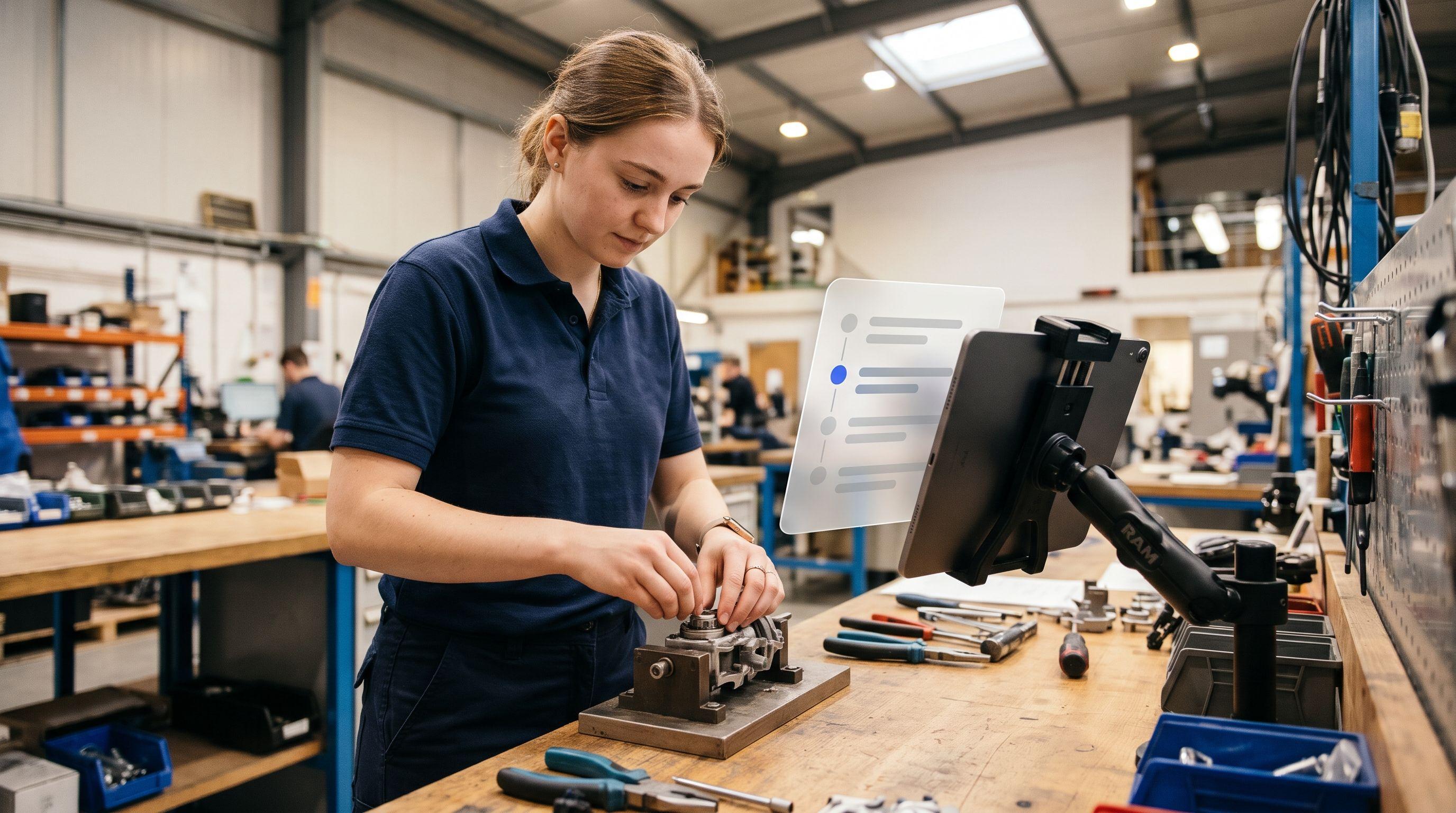
A food manufacturer with three plants wants to give its shift teams better support. Work instructions sit in binders at the lines, qualifications are tracked in an HR spreadsheet, inspection records are filled in on paper and typed up later, and short-notice updates go out through the shift leads’ messenger group. Each tool works more or less on its own. Taken together, though, they give no clear picture of who can do what, who did what, and which instruction currently applies. The example is fictional, but typical of many companies.
Connected worker platforms promise to connect exactly these silos. The challenge when choosing one: the term covers very different products, from no-code app builders for the factory to inspection apps for hotels. Most comparisons you find on the topic come from vendors who put themselves in first place. In this article you will find a definition, the key selection criteria for companies in Germany, Austria and Switzerland, 7 vendors assessed against the same criteria, and a recommendation for each use case. Elephant is one of the 7 vendors.
What is a connected worker platform?
A connected worker platform is software that digitally connects operational employees, the so-called frontline, with the knowledge, processes, training and data they need to do their work. Frontline means everyone who does not work at a desk, for example in production, maintenance, logistics, construction, service or care. The analyst firm LNS Research describes connected worker platforms as digital technologies that better connect frontline workers with their work environment (LNS Research, 2019). There is no single standardized definition.
In practice, most platforms combine several of the following building blocks:
- Digital work instructions and SOPs that guide workers step by step through a task
- Checklists and forms for inspections, audits and maintenance, with measurements, photos and signatures
- Training and qualification, meaning onboarding, mandatory safety briefings, courses and proof of who is qualified for what
- Knowledge and communication, such as document search, sending updates and assigning tasks
- Data and integration, meaning analytics and connections to ERP, MES or machines
Hardly any vendor covers all building blocks equally well. Most platforms have a clear focus. That is exactly what makes comparison difficult, because two platforms with the same label often solve very different problems.
How it differs from MES, worker assistance systems and LMS
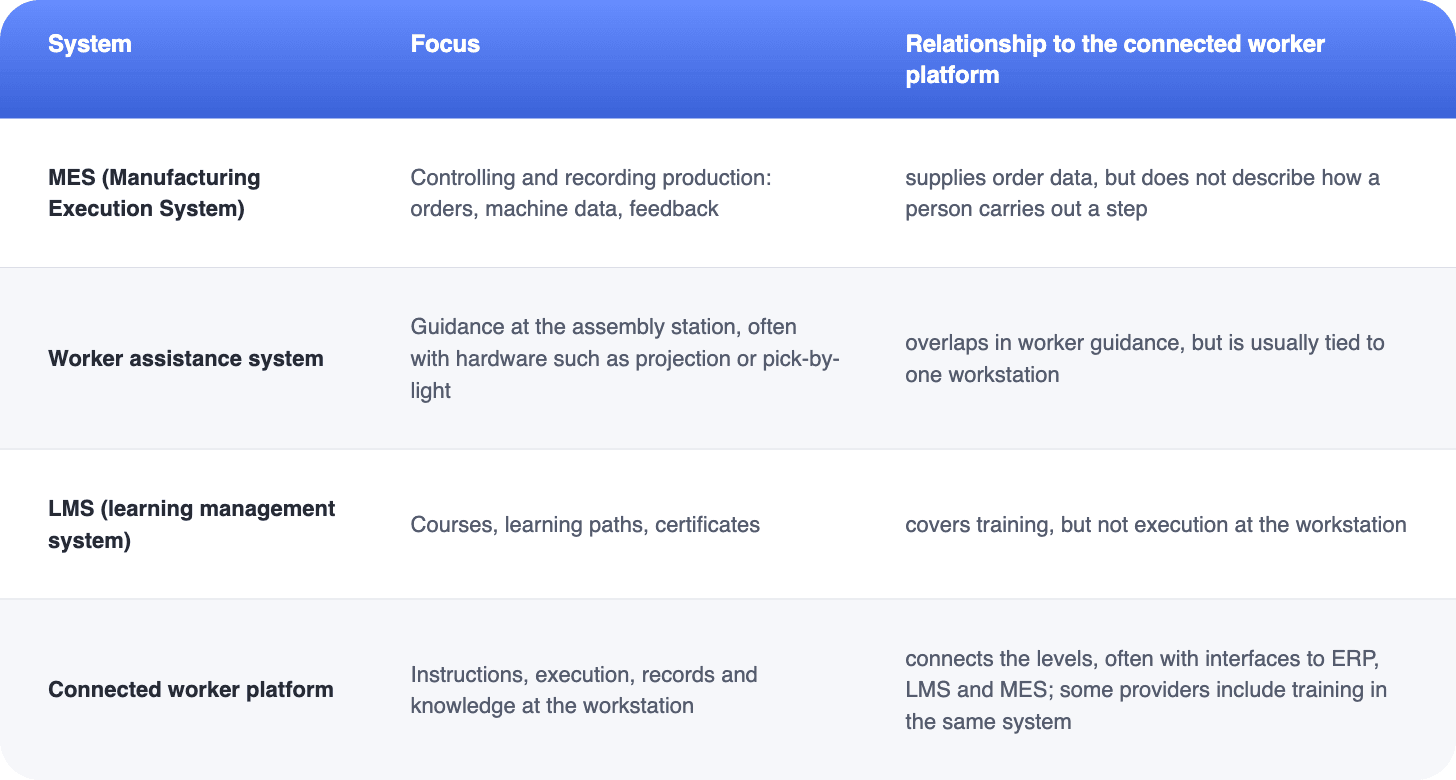
A clear-cut definition of connected worker platforms is made even harder by their overlap with other software categories, in particular MES (Manufacturing Execution System), worker assistance systems and LMS (Learning Management System).
Selection criteria
Before you compare vendors, it pays to ask which problem the platform should primarily solve. Is it about errors in assembly, documentation for audits, onboarding new employees, or knowledge that is lost when people retire? Depending on the answer, the criteria carry different weight. We described all vendors in this article against the same eight criteria:
- Focus and target industries: Which industries and company sizes is the platform built for? A solution for pharma batch records is not necessarily a fit for a logistics provider.
- Work instructions and checklists: How well does the platform guide workers through a task? Are there input fields for measurements, photos and signatures, conditions for error cases, and clean versioning?
- Creation: How quickly is an instruction created? Some platforms rely on a builder, others use AI to create a draft from documents or videos.
- Training and qualification: Can you document safety briefings and maintain qualifications, or do you need a second system for that?
- Integration: Are there interfaces to ERP, MES or machines, and how much effort does the connection take?
- Language: Is there a German user interface and German-language support? How well do translations work for multilingual teams?
- Hosting and data protection: Where is the data stored, and which certifications such as ISO 27001 or SOC 2 are in place? For many companies in the EU, and especially for IT departments, this is a minimum requirement.
- Pricing model: Is billing per user, per device or per site? Especially with many frontline employees who use the system only a few minutes a day, this makes a big difference.
Many teams underestimate two things: the effort of creating the first 50 instructions, and the co-determination rights of the works council. A platform that records task execution with person and timestamp, and therefore enables performance monitoring, is generally subject to co-determination. Plan for both from the start, so you avoid unpleasant surprises and internal opposition to the project later on.
The platforms at a glance
Augmentir
Augmentir describes itself as an AI-native connected worker platform for industry. The platform connects work instructions and checklists with skills management, training and workforce analytics. The AI assistant Augie creates procedures from Excel, Word, PDF, images and videos. Target industries include automotive, chemicals, food, pharma, and oil and gas. Augmentir integrates with ERP, CMMS, QMS, MES and LMS.
Good fit for: Industrial companies that want to connect work instructions and qualification data in one system.
Keep in mind: Prices and hosting location are not public; a German website is available.
Elephant
Elephant is a connected worker platform from Germany that connects work instructions, training, compliance and access to knowledge directly at the workplace. Elephant covers three areas. First, work instructions: the SOP Builder uses AI to create a draft from a video of the task or from existing documents such as PDF, PowerPoint or Word. The instruction is available as a guide for reference or as a checklist with input fields for measurements, photos and signatures. Employees open it on a smartphone, tablet or desktop, or via QR code directly at the machine; completed checklists are saved as reports with person, time, measurements and signatures. Second, training: micro-learning courses and audit-proof mandatory training with certificates, created with an AI authoring tool. Third, knowledge: an AI assistant answers employees’ questions directly from company knowledge. Interfaces to LMS and HR systems as well as a REST API let you integrate Elephant into existing system landscapes. Elephant is ISO 27001 certified (TÜV SÜD) and GDPR compliant.
Good fit for: Companies that want to make processes more efficient, preserve the knowledge of experienced employees and connect instruction and training, in manufacturing as well as in logistics, construction, care and service.
Keep in mind: No direct machine connectivity and no no-code app builder.
Pricing: SOP Builder from EUR 3,800 per year including 1 creator, with unlimited instructions and inspection records. Viewing via link or PDF is free and unlimited, and 30 submissions per month without login are included. Each additional creator costs EUR 900 per year.
Create work instructions from a video
Film the task with your smartphone, and the AI turns it into a draft with work steps that you review and refine. In a demo, we will show you exactly how the SOP Builder works.
Mitti
Mitti describes itself as the operating system for every site, every shift and every standard. Its focus areas are inspections and checklists, incident reports, tasks, on-the-job training, asset maintenance and protection of lone workers. The AI creates checklists and training, and photos or voice notes are turned into reports. Target industries include hospitality, construction, manufacturing and retail. According to its security page, Mitti runs on AWS and is certified to ISO 27001 and SOC 2 Type II.
Good fit for: Companies with many sites that want to digitize inspections and audits quickly.
Pricing: Free for up to 10 people, Premium at USD 24 per license per month billed annually, Enterprise on request (pricing page).
Operations1
Operations1, based in Augsburg, positions itself as a connected worker platform for manufacturing, especially machinery, plant and vehicle manufacturing and the food industry. The platform offers multimedia, variant-specific work instructions, inspection records, 5S audits, qualification management and dashboards, plus interfaces to SAP, ERP and MES. The AI converts existing Word, PDF, Excel and PowerPoint documents into instructions. According to the FAQ on its website, data of European customers is stored in Microsoft Azure in Frankfurt, and the company is ISO 27001 certified.
Good fit for: Larger manufacturing companies, according to the pricing page from 500 employees.
Pricing: Professional and Enterprise packages on request (pricing page).
Parsable (CAI Software)
Parsable has been part of CAI Software since September 2024. The platform turns paper procedures into guided digital workflows with a no-code editor, offline execution, dashboards and connections to MES, SAP and IoT via a REST API. Named customers include Grupo Bimbo and Holcim.
Good fit for: Large manufacturers with international plants.
Keep in mind: Website mostly in English, prices and hosting not public.
Poka (IFS)
Poka has been part of the software group IFS since 2023 and positions itself with “Industrial AI for Connected Work”. The platform combines work instructions, skills management, forms and checklists, an internal feed for plant communication and shop floor boards. The AI converts existing SOPs into instructions and translates content.
Good fit for: Industrial companies that want to bring together communication, skills and instructions, especially with IFS as their ERP.
Keep in mind: We did not find a German website; prices on request only.
Tulip
Tulip is a no-code platform that manufacturers use to build their own apps for work instructions, quality, training and analytics. Its strengths are connectors to machines and ERP, electronic batch records and metrics such as OEE. The AI creates apps from SOPs and photos, translates and uses computer vision. Target industries are pharma, medical devices, aerospace and industrial manufacturing. Tulip is based in the US and has a European office in Munich.
Good fit for: Manufacturers with in-house expertise that want to build applications themselves and connect them deeply to machines.
Pricing: Essentials USD 100 and Professional USD 250 per interface per month, billed annually, minimum 10 interfaces (pricing page). An interface is a device such as a tablet or station.
Comparison table
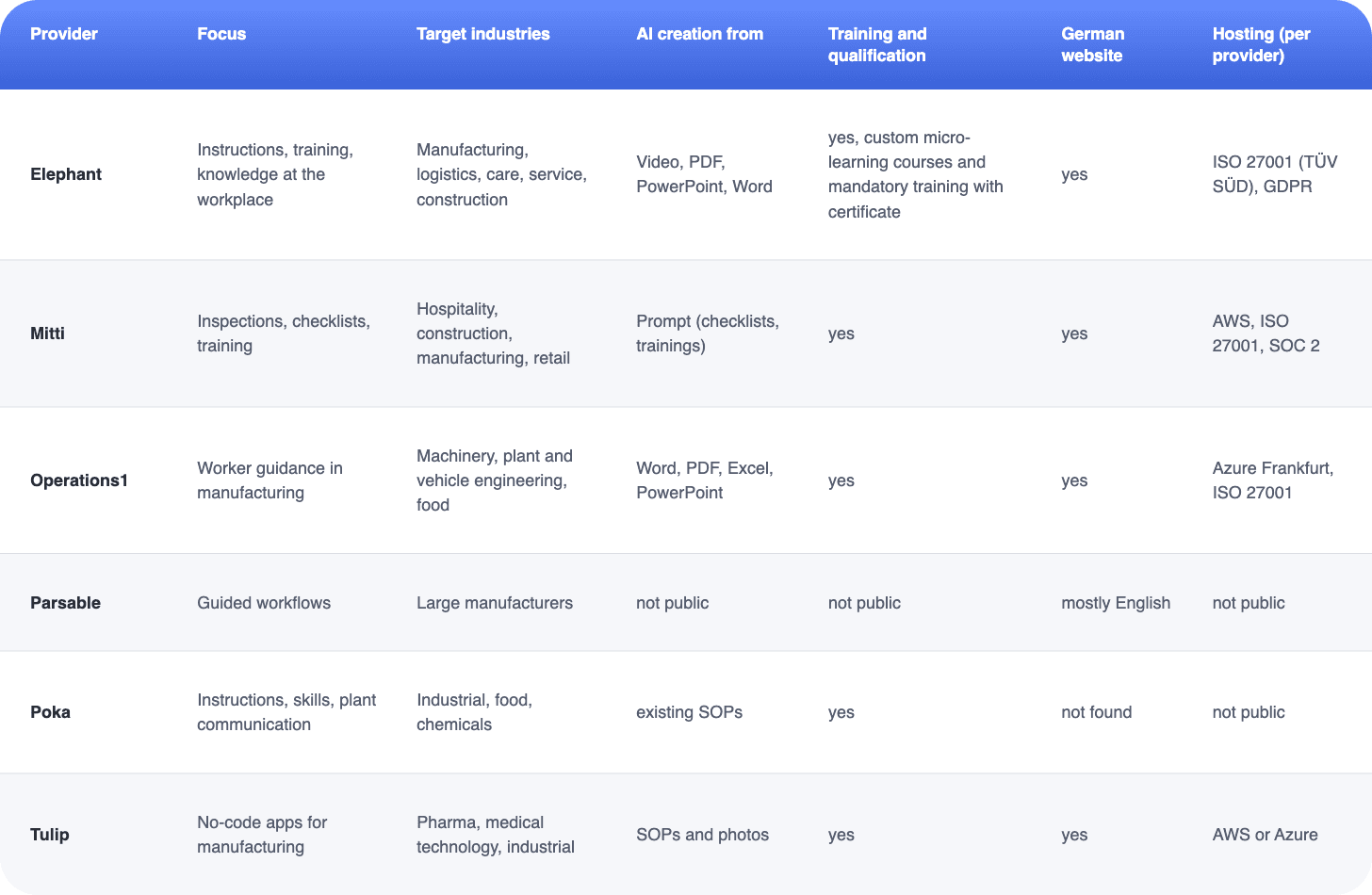
The table summarizes the vendors’ public information as of 25 Oct 2026. “Not public” means: not stated on the pages we reviewed, not that the feature does not exist.
Sources: the vendor pages linked in each profile.
Which platform fits which use case?
There is no best platform, only the right one for your most important problem. This overview helps you narrow down your shortlist:
If you are unsure, start with a pilot: one line or one site, 5 to 10 tasks, and a clear goal such as fewer follow-up questions or shorter onboarding. Test at least two vendors with a real task from your operations, not with demo content. That way you will see how long creation really takes and how well your team handles the software.
See Elephant in your own use case
From a work instruction created from a video to audit-proof training with a certificate: we will show you using your own use case.