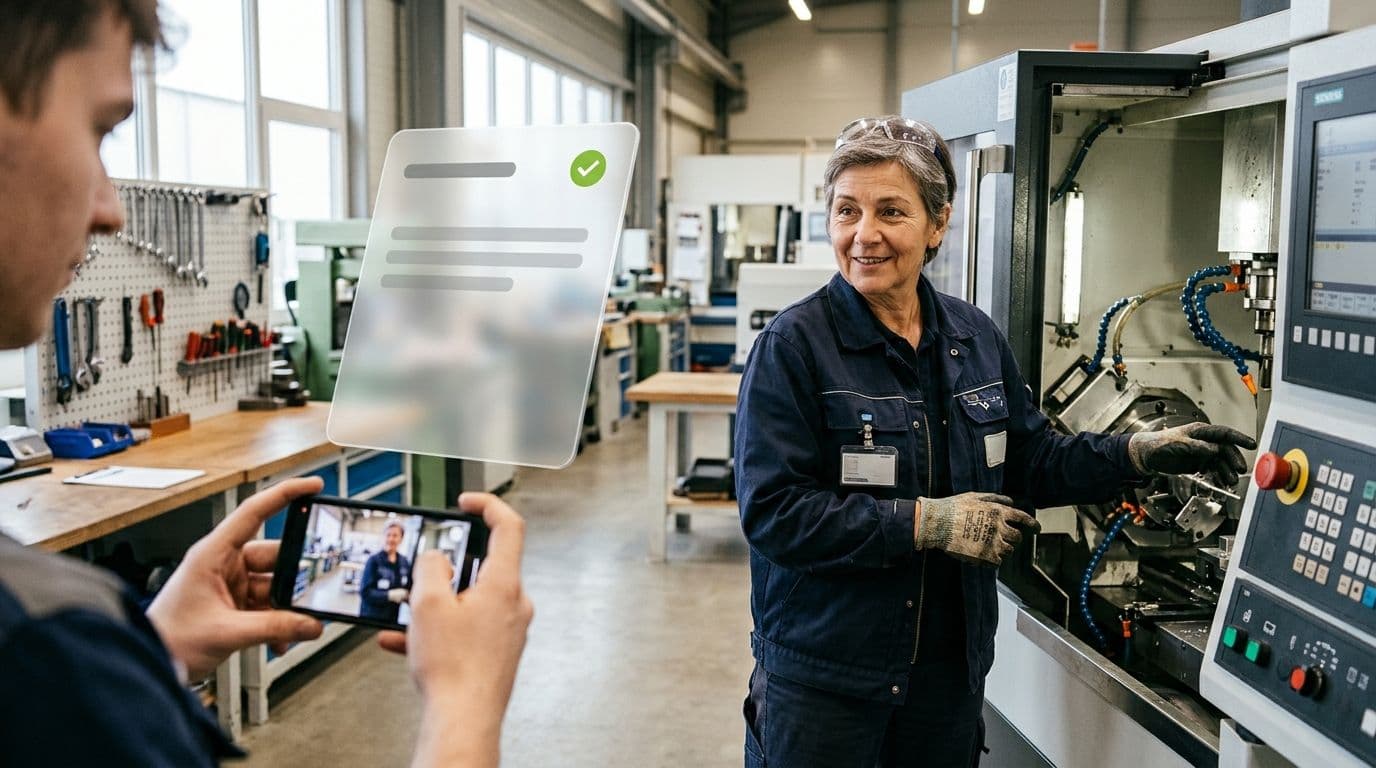
Almost every company knows this situation: at the machine there is that one experienced colleague who has known every move for years. She knows in which order the cover comes off, which screw she only tightens by hand and how to hear that something isn’t running smoothly. Almost none of this is written down. As long as she is around, hardly anyone notices. At the latest when she has to train someone new or retires, it becomes a problem. An SOP would help, but creating one by hand takes hours: observing, taking notes, taking photos, writing and aligning. Nobody has that time in day-to-day work, so the knowledge stays where it has always been: in the head of a single person.
AI changes this equation. Instead of writing, you film the task, and the AI turns it into a structured draft for an SOP that documents knowledge and serves as a guide for new employees. In this article you’ll learn which approaches exist, what the process looks like in 5 steps, what to pay attention to when filming and what you as a human still need to check.
Why SOPs take so long by hand
The time goes less into writing than into everything around it: getting knowledge out of experienced employees’ heads, documenting alongside the actual work, aligning drafts with QM and starting over with every change to the machine. The result: important processes are not documented at all or only in outdated form, and every shift works a little differently. This is exactly where AI takes a lot of work off your plate.
Three ways to create an SOP with AI
“Creating an SOP with AI” can mean many things. Which approach fits depends on where the work takes place.
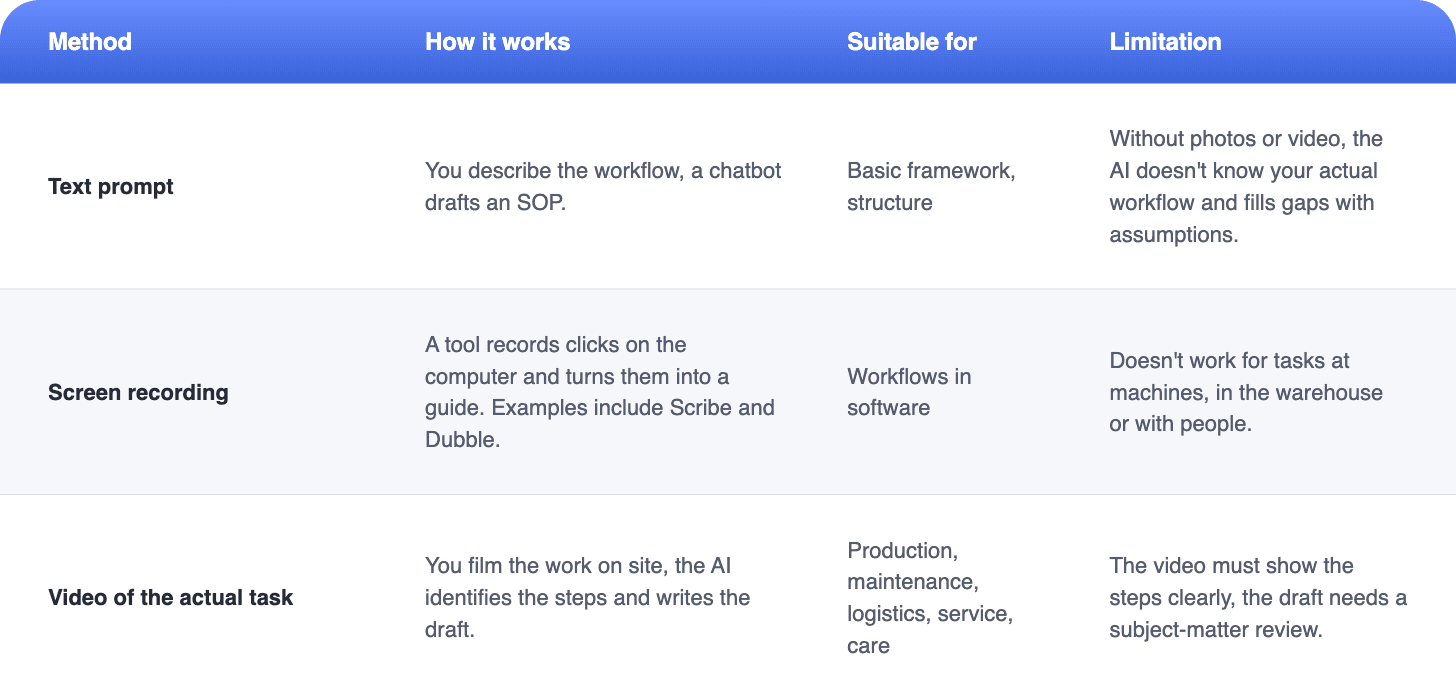
For operational teams, the third option offers the greatest value, because their work doesn’t happen at a screen. A chatbot can neatly structure a maintenance process, but without images or video it knows neither your machine nor your people’s tricks. A video of the actual task, on the other hand, shows exactly what should later be in the SOP.
From video to finished SOP in 5 steps
If you want to create a work instruction, the classic approach is: select the task, record the process on site, write the steps, add images, test and approve. With AI, this process stays essentially the same. Most of the note-taking and writing, however, disappears. Filming and the AI take care of that. You review and add.
We’ll show what this looks like in practice with a fictional example. In a mid-sized machine-building company, the same maintenance technician has been doing the regular maintenance on a milling machine for many years. There is no up-to-date guide for it, only a few handwritten notes in the tool cabinet. Because he is retiring in the foreseeable future, the head of maintenance wants to secure his knowledge but has no time to stand next to him for days taking notes. This is how it works in this case with Elephant’s SOP Builder.
1. Film the task
First, pick a task that has a clear beginning and a clear end, such as a maintenance job, a format changeover or starting up a line. Then have the most experienced person carry out the task once from start to finish and film them with a smartphone. You don’t need a camera crew. For more immersive content, you can also film from a first-person perspective with smart glasses or a GoPro as an extra. More important than the technology is that the person works at their normal pace and explains out loud what they are doing and what they pay attention to, because this knowledge isn’t written down anywhere else. In the example, a colleague films the maintenance technician during the next scheduled maintenance.
The quality of the draft depends heavily on the video. What can’t be seen in the picture or heard on the audio, the AI can’t recognize either. With these tips you get as much as possible out of a single run:
- Comment out loud. The person says what they are doing and why: “Now I’m checking the pressure, it has to be above 4 bar.”
- Get close. Film hand movements, displays and components so they are clearly visible.
- Keep it steady. Support the smartphone or have a second person film.
- One process per video. Better three short videos than one with three tasks.
- Show the error case. If possible, explain what happens when something doesn’t work.
- Consider data protection. Clarify in advance who is in the picture and get their consent.
2. Upload the video to the SOP Builder
Then upload the video to the SOP Builder. The AI uses it to create a draft with work steps, which you review and complete in the next step. It takes into account not only what can be seen, but also what the person explains on the audio track while working.
3. Review the draft
The AI creates a draft with steps. Read it alongside the video and check whether the order and content are correct. It’s best to do this together with the person shown in the video. They will immediately notice if a move is missing that was so obvious during filming that nobody mentioned it. In the example, the head of maintenance and the maintenance technician go through the draft together and add a check step that he previously just kept in his head.
4. Complete
Now you turn the draft into an SOP for everyday use:
- Attach images, videos and tables directly to the important steps
- Add safety and quality notes
- Add input fields for measured values, photos and signatures, with transfer to your ERP or CRM if needed
- Define conditions and jumps, for example a separate process for the error case
- Standardize terms via the glossary, add translations and check whether the technical terms fit in every language
In the end, the SOP should contain everything that makes a good work instruction: header data with number and version, assignment to the higher-level process, purpose, scope, responsibilities, materials, the procedure with checkpoints, the procedure in case of errors and a change history. An SOP example shows what the finished result can look like.
5. Approve and roll out
Approve the SOP and make it available to your team. Employees open it on a smartphone, tablet or desktop. If you need paper for the audit, print it out or save it as a PDF. Via the login, you assign the SOP to specific teams, roles or people and define who receives it and when, for example only experienced machine operators and only after they have been instructed. With a signature directly in the SOP, you also document that the instruction has taken place. In the example, the maintenance team opens the SOP on a tablet right at the milling machine during the next maintenance, works through it step by step and enters measured values directly in the fields provided.
Digital SOPs your team uses right at the workplace
With the SOP Builder, you create SOPs from a video of the task, add input fields for measured values, photos and signatures and make them available to your team in the app. We’ll show you using your own use case.
What the AI delivers and what humans need to check
AI takes care of structuring and writing for you. The professional responsibility stays with you.
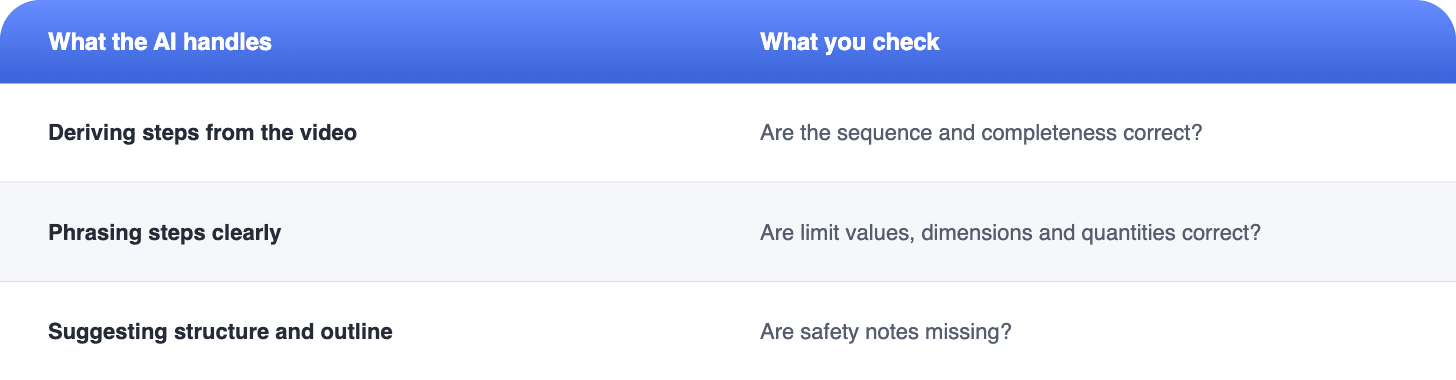
After that, the SOP goes through the same review and approval as any other work instruction. At this point the question often comes up whether an SOP created with AI is audit-ready at all. The answer is yes, if you review it, approve it and keep it up to date like any other SOP. ISO 9001 does not prescribe how a document is created, but that it is correct, current and available. Whether a person or an AI typed the first draft therefore makes no difference to the standard. What matters is that a qualified person has reviewed and approved the content and that you can show at any time which version is currently valid. Then your SOP meets the same requirements as any audit-proof work instruction.
What if I just use ChatGPT?
For a first basic framework, a chatbot is often enough. In day-to-day operations, it quickly reaches its limits:
- No document management. You have to organize version, approval and distribution yourself.
- No execution. A text file doesn’t guide anyone through the work and doesn’t record any evidence.
- No connection to ERP or CRM. Measured values and inputs don’t automatically end up in your systems.
- No signatures. You have to document separately that an instruction has taken place and have it signed.
- No comparison with practice. Chatbots like ChatGPT can now analyze photos and to some extent videos. Whether the draft matches your actual process, you still have to check step by step yourself.
- Data protection. Clarify in advance which company information you are allowed to enter into an external tool.
So a chatbot helps with writing. For SOPs that your team uses and maintains at the workplace, you need a tool that combines creation, rollout and execution.
When an SOP with AI is especially worthwhile
Not every task needs an SOP from video right away. The AI route pays off especially when one of these situations applies to your company:
- Many undocumented processes. You’re starting from zero and need a foundation quickly.
- Knowledge is retiring. Experienced employees will leave the company in the next few years.
- High turnover or temporary workers. New people have to work safely quickly.
- Multilingual teams. An SOP should be available in several languages.
- Frequent changes. New products or variants constantly require new processes and instructions.
If you recognize your company in one or more of these points, it’s best to start with a single task. Pick one that often raises questions, that only one person masters reliably or where staffing changes frequently, and try out the route from video to SOP with it.
Create SOPs in minutes instead of hours
Film your first task and get a draft with work steps. In a demo, we’ll show you exactly how the SOP Builder works.