
If you search for an SOP example, you will mostly find generic templates or examples from office work, IT and laboratories. For production or warehousing, these examples are of little use, because people there work with machines and goods, not with spreadsheets at a desk.
This article shows you what makes an SOP, what goes into it and how to keep it up to date. You also get two complete examples from production and logistics, each with the situation that led to it. You can use them right away and adapt them to your operation.
What is an SOP?
SOP stands for Standard Operating Procedure. An SOP defines how a recurring process is always carried out the same way and correctly, regardless of who performs it, on which shift and at which site. So it does not describe how someone might ideally do a task, but how your company carries out this process as a binding standard.
The term is best known from highly regulated fields such as pharma, laboratories and medicine, where every work step must be traceable. Today, however, production, logistics, care and service use it too: anywhere many people carry out the same processes, those processes are or should be standardized, and small deviations can have big consequences.
In day-to-day work, a good SOP does several jobs at once. It makes sure a process runs the same way on the early shift as on the night shift, and at one site the same as at another, so quality does not depend on who happens to be on duty. It protects employees, because safety steps such as shutting down a machine are a fixed part of the process and do not get lost in the heat of the moment. New colleagues find their way faster with an SOP, because they do not have to ask experienced colleagues every question. At the same time, the SOP captures exactly this hands-on knowledge, which would otherwise be lost when someone changes jobs or retires. And when a customer or a certification body wants to know in an audit how your team controls a process, the SOP is your proof.
SOPs are mandatory mainly in regulated industries such as pharma and medicine. ISO 9001, by contrast, does not require documents called SOPs, but documented information for the processes that affect quality. In practice, SOPs meet exactly this requirement.
SOP vs. work instruction: the difference
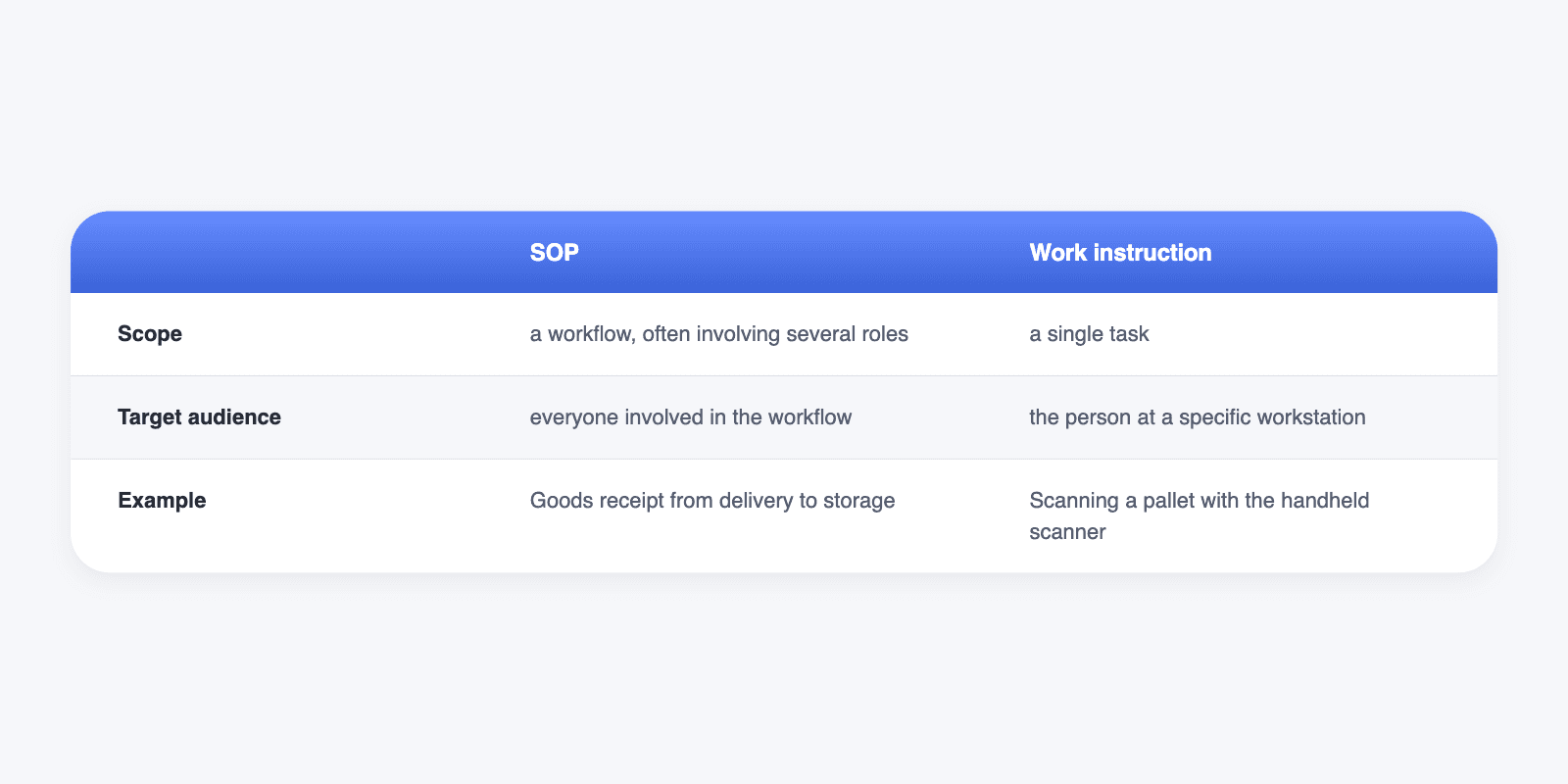
In practice, many companies use the terms SOP and work instruction interchangeably. If you want to separate them, this rule of thumb usually applies:
Two types of SOPs: guide and checklist
Not every SOP serves the same purpose. Some your colleagues read through once at their own pace and look up later when needed. Others they work through step by step right at the machine. That is why it helps to distinguish two types:
- Guide: shows how a process works. Employees look things up in it, for example for a task they rarely do.
- Checklist: guides you step by step through the execution, records what has been done and who carried out the process, and documents test values. Typical for inspections, maintenance and checks.
Which type you choose depends on how your team uses the SOP day to day. In the two examples below, you can see which type each one is.
What goes into an SOP
How detailed an SOP gets depends on the process. The structure, however, is almost always the same, and these building blocks cover everything your colleagues need to know to carry it out:
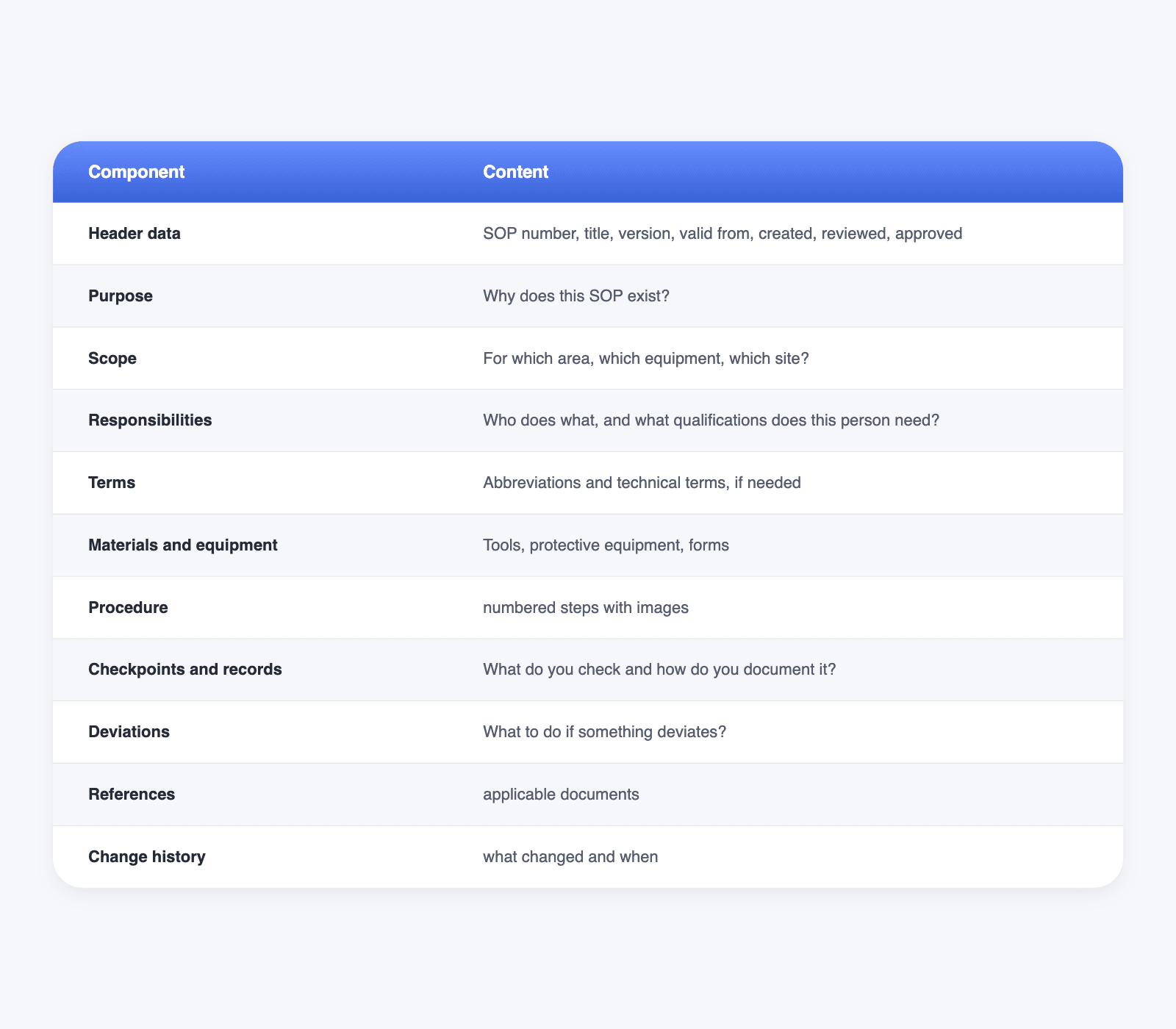
Not every building block needs much space. You can leave out terms and references if there are none, and the purpose can often be summed up in a single sentence. The heart of the SOP is the procedure: it pays to phrase every step as a clear action and to illustrate key points with a photo, because a good image often replaces a whole paragraph.
That leaves the question of how long an SOP should be. The rule of thumb: as short as possible and as long as necessary. If a process no longer fits on two pages, it is better to split it into several SOPs, for example one for preparation and one for the actual execution. Your colleagues are more likely to read short SOPs, and you can keep them up to date more easily.
The draft is best written by the person who carries out the process every day, for example the machine setter or the shift supervisor. Quality management reviews it, and the responsible manager approves it. If an SOP is written only at a desk, it often works on paper but not on the machine.
Your SOP is in a binder. Your team is at the machine.
With the Elephant SOP Generator, every shift has the current version right on a smartphone or tablet. No searching, no printouts, no outdated versions.
SOP Example 1: Cleaning a filling line (production)
The first example comes from a beverage manufacturer with several filling lines. Line A3 runs different products every week, and after each product changeover the team cleans the line before the next product is allowed to start. For a long time, every shift did this a little differently: one rinsed thoroughly first, another started the cleaning program right away. During a customer audit, the question also came up of how the company actually documents the cleaning, and there was no satisfactory answer. Production management therefore revised the SOP and added photo evidence, a signed log and sign-off by the shift supervisor in version 2.
This example is a checklist: it guides you step by step through the cleaning and records every completed step as evidence. Like both examples in this article, it is fictional, so adapt values, agents and responsibilities to your operation and your requirements.
Header data: SOP-PR-007 · Version 2 · valid from 11/01/2026 · created by: Production management · approved by: Quality management
Purpose: Filling line A3 is clean and released for the next product after every product changeover.
Responsible: Line operator on the current shift. Sign-off by the shift supervisor.
Materials: Cleaning agent according to the cleaning plan, safety goggles, gloves, cleaning log.
Procedure
- Stop the line and secure it against being switched back on.
- Drain the remaining product into the designated container.
- Pre-rinse the system with water until the water runs clear.
- Start the cleaning program according to the cleaning plan.
- Visually inspect the filling valves. Take a photo as evidence.
- Enter the cleaning with the time in the log and sign it.
- Get sign-off from the shift supervisor before the next product runs.
Deviations: If residue is visible after cleaning, repeat step 4. If it remains, lock out the line and inform the shift supervisor.
SOP Example 2: Checking incoming goods (logistics)
The second example takes place in the warehouse of a spare parts wholesaler. Several deliveries arrive there every day, and especially in peak season, many temporary workers who do not yet know the process work in goods receipt. Damaged boxes kept ending up on the shelves, and complaints to the supplier went nowhere because nobody had noted the damage on receipt. Warehouse management therefore added two points to the SOP in version 4: a photo of every damage and confirmation by the driver.
Unlike the first example, this SOP describes a process with several roles, from goods receipt to purchasing. That makes it suitable as a guide that new colleagues read at their own pace before their first shift and look up again later when unsure.
Header data: SOP-LO-003 · Version 4 · valid from 11/01/2026 · created by: Warehouse management · approved by: Quality management
Purpose: Only complete and undamaged goods enter the warehouse.
Responsible: Goods receipt staff. Deviations are resolved by purchasing.
Procedure
- Match the delivery note against the purchase order in the system.
- Count the packages and compare them with the delivery note.
- Check the packaging for visible damage. Photograph every damage.
- Note deviations on the delivery note and have the driver confirm them.
- Book the goods into the system.
- Take them to the assigned storage location.
Deviations: If goods are missing or damaged, book in only the flawless part. Put the rest in the quarantine area and inform purchasing the same day.
Keeping SOPs up to date
An SOP only helps as long as it correctly describes the current process. Anyone who has ever faced two versions of the same process knows this: version 2 hangs on the board next to the machine, version 3 sits in the binder, and nobody knows for sure which one applies. At the latest, it comes to light in the audit or after the next mistake. To keep it from getting that far, three simple rules help:
- One responsible person per SOP: They maintain the content and trigger changes.
- Clear versions: Every change gets a new version number and an entry in the revision history.
- Briefing after every change: Everyone affected learns what is new and confirms it.
And when do you update an SOP? Immediately, when something changes in the process, a machine or the material, not only at the next scheduled review. In addition, it pays to set a fixed date on which you review every SOP, for example once a year, even if nothing seems to have changed. You will often find that a different hand movement has long since crept in during daily work, which you either add to the SOP or correct again.
On paper, however, these rules are tedious to implement. You have to print every new version, distribute it and swap it for the old one everywhere, and a single forgotten printout is enough for the wrong version to apply again. Digital SOPs can take a lot of this work off your hands, because everyone can open the same SOP in one place.
From paper SOP to digital SOP
A paper SOP shows the process, a digital SOP guides you through it. You notice the difference at the machine at the latest: instead of looking for a printout, the person opens the SOP in the app on a smartphone, a tablet or in the browser, goes through it step by step and records measured values, photos and signatures directly in the process. With the Elephant SOP Generator, you can map both SOP types from this article like this:
- Guides for looking things up, with text, tables, images and videos
- Checklists for execution, with input fields for measured values, photos and signatures
- Conditions and jumps, so that a deviation leads directly into its own process
- Repetitions for steps whose number varies, for example several pallets in goods receipt
- Translations for multilingual teams
If you do need paper at a workstation, for example as a notice on the machine or as a document for an audit, you can print the SOP from the document view or save it as a PDF. So you do not have to choose between paper and digital, but can switch over at your own pace.
The AI creates the first draft from a video of the task. Even when you create an SOP with AI, the draft remains a starting point: you review it, add photos and checkpoints from your operation and only then approve it.
No more version 2 on the board and version 3 in the binder
One SOP, one valid version, at every workstation. See in a demo how to create SOPs with the SOP Generator and make sure every shift works with the current version.