

We all know the scene: a laminated work instruction has been hanging on the machine for three years, describing a procedure nobody follows anymore. Paper, as they say, is patient. As soon as experienced team members go on vacation, or even leave the company, new colleagues would rather ask around. That costs time and leads to mistakes.
A good work instruction should solve exactly this problem. Of course, it only does so if it stays up to date. It describes a task so clearly that anyone can perform it correctly the first time, and it evolves whenever the product, machine, material or process changes. In this article, you’ll learn what belongs in a work instruction, how to create one in 6 steps, how to keep it current and what a finished example looks like.
What Is a Work Instruction?
A work instruction describes, step by step, how someone performs a single task at a specific workstation, and it is written for exactly the person who does that work. Typical examples include changing over a machine in production, cleaning a system or inspecting a component.
This makes it the most detailed document in process and quality management. While a process description shows how a workflow runs across several departments, a work instruction goes down to the individual hand movement: which button, which tool, which limit value. More and more companies are replacing paper-based work instructions with interactive, digital ones. These are easier to keep up to date and use videos to show processes more clearly and therefore more effectively. Through input fields, they also capture measurements and records directly on the job and transfer them to the ERP system. Many companies still keep an additional paper version for their ISO 9001 documentation, even though the standard does not prescribe any particular medium.
In everyday operations, it serves several purposes at once: it ensures a task is performed the same way on every shift and at every site, protects employees from hazards, safeguards the quality of the result and serves as evidence for customers and in audits. It also captures knowledge that would otherwise exist only in the heads of experienced colleagues, which shortens onboarding for new employees.
Different types of documentation are often confused, so here is a brief overview:
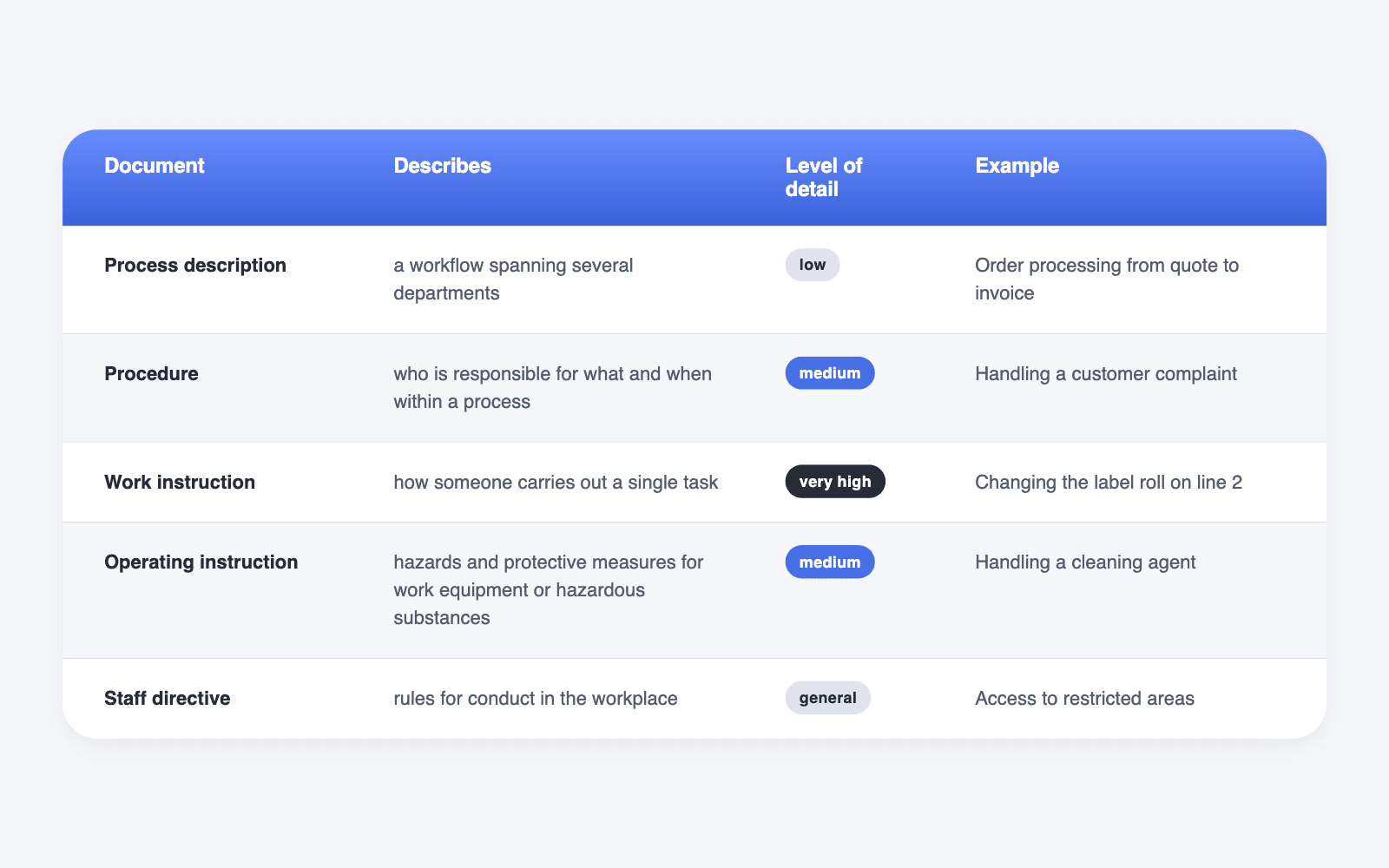
Work instructions and company directives are mixed up particularly often. A company directive governs general conduct in the workplace, such as access, working hours or data handling, and is based on the employer’s right to issue instructions under Section 106 of the German Trade Regulation Act (GewO). Its limits are set by the employment contract, collective agreements, works agreements and the law. A work instruction, by contrast, describes how a specific task is carried out properly. The document types work together: the process description sets the framework, the procedure defines responsibilities and the work instruction describes the individual task.
When Do You Need a Work Instruction?
Not every task needs its own document. A work instruction is especially worthwhile in these cases:
- The task poses a risk to safety or quality.
- You perform the task rarely, for example during annual maintenance.
- New employees, temporary agency workers or floaters regularly take over the task.
- Several shifts or sites need to follow the same procedure.
- Customers or an audit require proof of a defined procedure.
A good place to start: look at which tasks cause the most questions or errors. That is where your first work instruction will have the greatest impact.
Work Instructions Under ISO 9001
If your company works according to ISO 9001, there is another reason. The standard does not require a work instruction for every task, but it does require documented information to the extent your processes need to run as planned. If a work instruction exists, it must be controlled: it needs clear identification with title, date and version, must be reviewed and approved and must be available wherever someone needs it. Outdated versions must no longer be in circulation, and changes must remain traceable. The standard does not prescribe a particular medium, so your work instructions may also be digital.
Structure: What Belongs in Every Work Instruction
A work instruction consists of three parts: the header data ensures everyone uses the right version. The framework clarifies what the instruction is for and who it applies to. The procedure ensures the work gets done right.
Header data
- Title and document number
- Version and “valid from” date
- Created, reviewed and approved by
- Assignment: which process or procedure the work instruction belongs to
- Revision history: What changed and when?
Framework
- Purpose and scope: Which task, on which machine or at which location?
- Target group: Who performs the task, and what qualifications does that person need?
- Related documents: Operating instructions, inspection plan, drawing.
Procedure
- Prerequisites: Protective equipment, tools, materials, condition of the equipment.
- Work steps: Numbered, one step per action, with an image or video.
- Safety and quality notes: At the step where they apply, not collected at the end.
- Checkpoints: How does the person know the result is correct?
- Error handling: What to do if something goes wrong, and whom to inform?
Before you approve a work instruction, it’s worth doing a final check with the W questions. Each question stands for one building block of the instruction, and if one remains unanswered, something important is missing. Using the example of a label roll change on Line 2 at a food manufacturer, it looks like this:
- Who? Who performs the task, and what qualifications does that person need? In the example, it’s the operating staff of Line 2 who have been trained on the labeling machine.
- What? Which task exactly does the instruction describe, and where does it begin and end? Here, it’s the label roll change, from stopping the line to checking the first products.
- When? What triggers the task? For example, an empty roll or a product changeover.
- Where? At which machine, line or site does the instruction apply? Here, at the labeling machine on Line 2.
- With what? Which tools, materials and protective equipment do you need? Here, cut-resistant gloves and the roll with the matching item number.
- How? In which steps does the task proceed, and how do you recognize a good result? Here, six steps and a checkpoint with a maximum deviation of 2 mm.
- Why? What is the purpose of the task? People who know the purpose are more likely to follow the procedure and notice deviations faster. Here, the goal is to avoid mislabeled products.
- What if? What happens if something goes wrong, and whom do you inform? Here, you reload the roll and call maintenance after the second failed attempt.
If you can answer every question with a glance at the instruction, it is complete.
How to Create a Work Instruction in 6 Steps
These 6 steps will help you create a work instruction without any trouble:
1. Choose the Task
Don’t start with all tasks at once. Begin with the task that causes the most errors, questions or safety risks, or where staffing changes most often. That way, your first work instruction quickly shows that the effort pays off.
2. Capture the Process on Site
Don’t write the instruction at your desk. Go to the workstation and have the most experienced person show you the task. Film the process, for example with your smartphone. That way, no hand movements get lost that experts take for granted.
3. Write the Steps
Phrase each step as a clear command: “Insert the roll,” not “The roll should be inserted.” These rules help:
- one step, one action
- short sentences, active voice
- always the same terms for the same parts
- numbers instead of adjectives: “maximum deviation of 2 mm” instead of “slightly crooked”
4. Add Images and Videos
A photo of the correct result often explains more than three sentences. Add images to every step where position, direction or condition matters. For movements, a short video helps.
5. Test With an Inexperienced Person
Give the instruction to someone who has never done the task. Watch where the person hesitates or asks questions. That’s exactly where a step or an image is missing.
6. Approve, Train, Keep Up to Date
Have the instruction approved by the responsible department and train everyone affected. Safety training is mandatory under Section 12 of the German Occupational Safety and Health Act (ArbSchG). Under DGUV Regulation 1, the rules of the German Social Accident Insurance, it must take place at least once a year and be documented. For temporary agency workers, the host company is responsible for the training. In practice, employees confirm their training with a signature. This creates a record and increases commitment, so the instruction is actually followed.
To keep the instruction from hanging outdated on the machine again, define who maintains it at the time of approval. If the machine, material or process changes, this person updates the instruction immediately, and the new version receives a new version number. It’s also worth setting a fixed review date, for example once a year, even if nothing seems to have changed. That way, the instruction stays as current as the work it describes.
Example: Work Instruction for Changing a Label Roll
Here’s an example from a food packaging process to show what this looks like in practice. On Line 2 of a mid-sized manufacturer, several products with different labels run per shift. Operators change the label roll several times a day, across three shifts and with changing staff, regularly including temporary agency workers.
In September, there was a customer complaint: a batch had reached the customer with crooked labels because nobody checked the position of the first label after the roll change. The shift supervisor then revised the existing instruction and added a checkpoint in step 5. The result is version 3, shown below.
This example is fictional. Adapt values, names and contacts to your own operation.
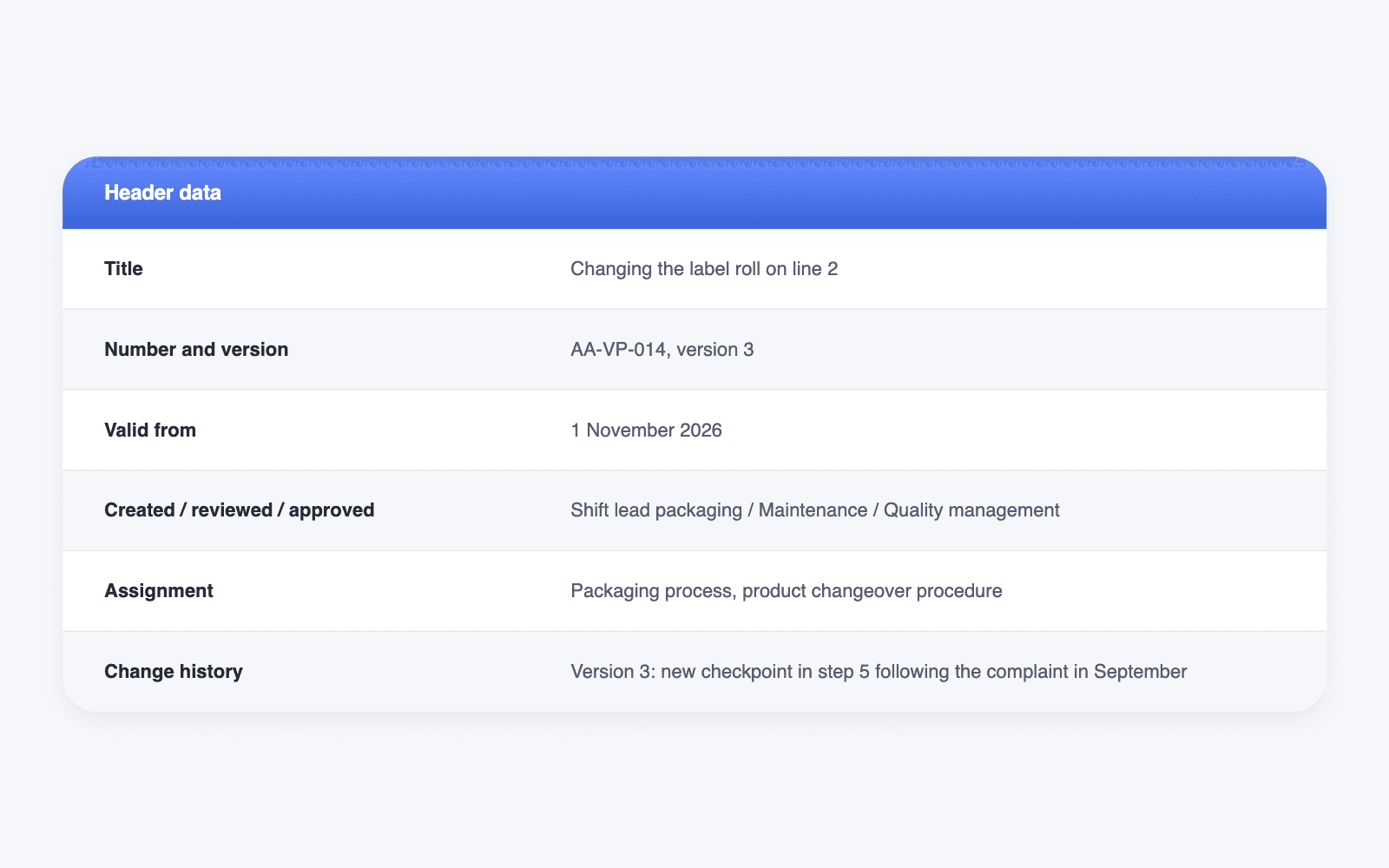
Purpose: Change the label roll on Line 2 without producing mislabeled products.
Target group: Line 2 operating staff trained on the labeling machine.
Prerequisites: Cut-resistant gloves, new label roll with the item number from the current order.
Work steps
- Stop the line using the “Stop” button. Wait until the belt has come to a standstill.
- Compare the item number on the new roll with the one on the order. If it doesn’t match, do not load the roll and inform the shift supervisor.
- Remove the empty core and dispose of it in the recycling bin.
- Mount the new roll and thread the label web as shown in image 2.
- Dispense a test label. Checkpoint: The label sits straight, maximum deviation 2 mm.
- Start the line and check the first 5 products.
Error handling: If the label is crooked, repeat step 4. If it still doesn’t work on the second attempt, call maintenance at extension 240.
Related documents: Labeling machine operating instructions, packaging inspection plan.
You’ll find more templates for maintenance, service and occupational safety in our work instruction template.
Common Mistakes and How to Avoid Them
Many work instructions fail not because of a lack of expertise, but because of how they are created and where they end up. These six mistakes are especially common:
- Too much text. Nobody reads continuous text on the line. Write numbered steps and replace explanations with images.
- Written at a desk. If you describe a process from memory, you forget the hand movements. Always capture the task on site.
- Outdated versions in circulation. Three printed versions at three machines lead to three ways of working. Keep exactly one valid version available.
- In a binder instead of at the workstation. An instruction on the intranet doesn’t help anyone standing at the machine. It must be accessible where the work takes place.
- Only in one language. If your team works in several languages, not everyone will understand the instruction. Translations and images close this gap.
- No error handling. Without a plan B, employees improvise. Always describe what to do if a problem occurs and whom to inform.
What stands out is that most of these mistakes have less to do with the writing than with the medium. A printout goes out of date, hangs in the wrong place and speaks only one language. This is exactly where digital work instructions come in.
From Paper to Digital: Digitizing Work Instructions
Creating a work instruction takes effort, and keeping it continuously updated takes a lot of time. The result: work instructions are often hopelessly outdated. Digital work instructions solve both problems: they can be updated centrally, use video and images to present processes more interactively and therefore more effectively, and capture measurements directly on the job.
With Elephant’s SOP Generator, you upload a video of the task. The AI creates a draft with work steps, which you review and complete. On top of that, you get:
- Images, videos and tables directly at each work step
- Input fields for measurements, photos and signatures as proof, with transfer to your ERP or CRM
- Documentation of who performed a specific changeover or inspection
- Conditions and branching, for example a separate flow for error handling
- Viewing on smartphone, tablet and desktop, plus a print version
- Translations and a glossary for consistent terminology
That way, the instruction is right where the work happens, in the language of the person doing it.
Create work instructions in minutes, not hours
Upload a video of the task and get a ready-to-edit draft with work steps. Book a demo to see how the SOP Generator works.