
In everyday life, AI tools have long been a fixture: type a question, get an answer, move on. Whether it's trip planning, a recipe, or investment tips, ChatGPT and similar tools have changed the way we access information.
In a work context, things often look different. There, such tools are frequently not yet available, or at least not at the quality level people are used to in their private lives. Yet the benefit is obvious: company knowledge, available to everyone at any time through a chat interface. No digging through folder structures, no "just ask the colleague who knows," no 200 page PDF manual.
The real question is just this: what's the right setup? And how do we keep our data secure? The options are wide ranging, from a self hosted internal LLM to Microsoft Copilot and enterprise search providers, all the way to custom GPTs or an enterprise ready AI assistant like Elephant's. Every option has its place. Here's the overview.
Option 1: The In House Internal LLM
The maximum solution: the company runs its own language model (usually an open source model like Llama or Mistral) on its own infrastructure or in a private cloud, and connects it to internal data sources itself.
Strengths: Maximum control over data and model behavior. Nothing leaves the company's own infrastructure. Often the decisive argument for heavily regulated industries or especially sensitive data. Full flexibility for customization.
Weaknesses: The effort involved is enormous. It requires a dedicated team to build and operate it, connecting the knowledge sources (the RAG pipeline) has to be developed and maintained in house, and answer quality depends entirely on your own implementation. Without continuous development, the setup quickly becomes outdated. Realistically, this is an option for large enterprises with their own AI/IT department, not for mid sized companies.
Option 2: Microsoft 365 Copilot
For companies already living in the Microsoft ecosystem, this is the obvious choice: Copilot accesses emails, Teams chats, SharePoint, and Office documents, and answers questions directly within familiar applications.
Strengths: Deep integration into Outlook, Teams, Word, and more. No new interface, central administration through the existing Microsoft environment, established compliance structures.
Weaknesses: Copilot is only as good as the data hygiene in your own Microsoft tenant, and that's rarely good. Outdated SharePoint repositories and permissions that have grown organically over time directly undermine answer quality. Knowledge outside Microsoft (other tools, specialist systems) is left out. Above all, Copilot requires a desktop workstation with a Microsoft license. Employees without their own Office workstation, meaning frontline teams in particular, are barely reached by it.
Option 3: Enterprise Search Providers
Providers like Glean, or comparable solutions, connect to the tools used across the company (Drive, Confluence, Slack, CRM, and so on), index the content, and layer an AI chat interface on top.
Strengths: Very broad coverage across many systems, often mature permission logic (everyone sees only what they're allowed to see), good answer quality thanks to specialized search infrastructure.
Weaknesses: These solutions are built, and priced, for the desk based knowledge worker. Per user costs are typically very high. The rollout is a genuine IT project (connectors, permissions, governance). And the value depends entirely on the knowledge already being well organized within the connected tools.
Option 4: Chatbots & Custom GPTs
The fast route: with ChatGPT (Custom GPTs), a simple chatbot builder, or similar tools, you upload documents and have a working assistant for a well defined topic up and running within hours.
Strengths: Minimal effort, minimal cost, ready to use immediately. Ideal for testing internally whether the concept of "knowledge via chat" resonates within your own company.
Weaknesses: Doesn't scale. Documents have to be kept up to date manually, there's no clean rights and roles concept, no analysis of which questions are being asked, and depending on the setup, the data privacy question can be tricky (where do the uploaded company documents end up?). Great for a pilot, but a maintenance and compliance risk as a company wide solution.
Option 5: Enterprise Ready AI Assistant
The fifth category consists of specialized platforms that deliver an AI assistant as a finished product: connect knowledge sources or maintain documents centrally, manage rights and roles, run GDPR compliant operations, and provide features built for the actual target audience.
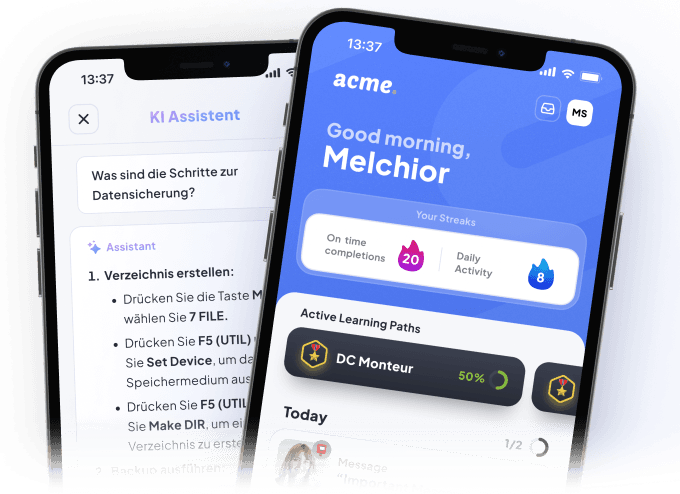
This is exactly where we come in with Elephant, with a deliberate focus: frontline teams. That means employees in field service, service technicians, assembly, the shop floor, or field sales: people without a desk, without an Office license, often without time for long documents. The assistant answers questions on mobile, right in the flow of daily work ("What was the torque spec for this model again?"), draws on centrally maintained company knowledge, and uses question analysis to reveal knowledge gaps and training needs along the way.
Strengths: Quick to roll out without a dedicated IT project, built for user groups that classic tools don't reach, rights and data protection concept included, and knowledge lives in one place instead of scattered across ten tools.
Weaknesses: Honesty applies here too: anyone primarily looking to serve desk based knowledge workers with knowledge from Microsoft tools is probably better served by Copilot. A specialized assistant plays to its strengths exactly where it was built to.
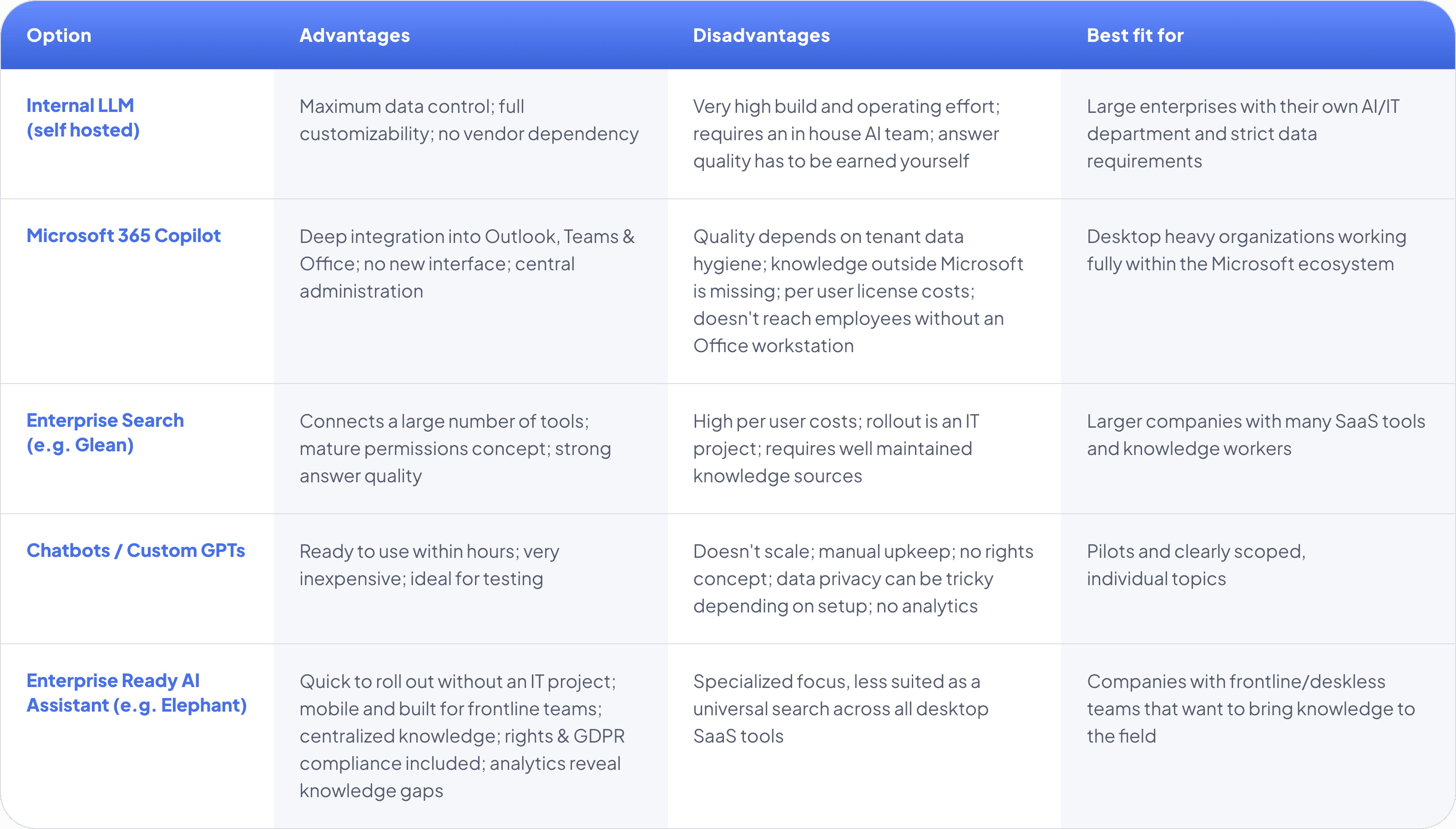
The Comparison at a Glance
How to Decide
Three questions will get you to an answer faster than any feature comparison:
1. Who is going to use the assistant? Desk based knowledge workers, or teams out in the field? This is the most important fork in the road. A tool that doesn't reach its target audience in daily life is worthless, no matter how good the technology is.
2. Where does your knowledge live today? Well maintained in Microsoft or across distributed SaaS tools? Then Copilot or enterprise search make sense. Scattered across PDFs, training materials, and people's heads? Then you need a solution that centralizes the knowledge first, rather than just making it searchable.
3. How much of a project can and do you want to take on? An in house LLM means months to years, enterprise search means a substantial IT project, a ready made assistant means weeks, and a custom GPT means an afternoon, each with the consequences described above.
Conclusion
Making company knowledge available through chat is no longer a question of whether, but of how. There's no single right setup, there's the right setup for your target audience, your data situation, and your resources. Anyone serving desktop teams within the Microsoft world will do well with Copilot. Anyone wanting to connect many tools should look at enterprise search. Anyone wanting to test the waters first should start with a custom GPT.
And for anyone wanting to reach frontline teams, the colleagues who keep things running out in the field and who simply aren't reached by most of these solutions, we built Elephant. Feel free to reach out to us.
Want to actually reach your frontline teams?
See how the Elephant AI Assistant brings company knowledge straight to colleagues without a desk, mobile, GDPR compliant, and without an IT project of your own.