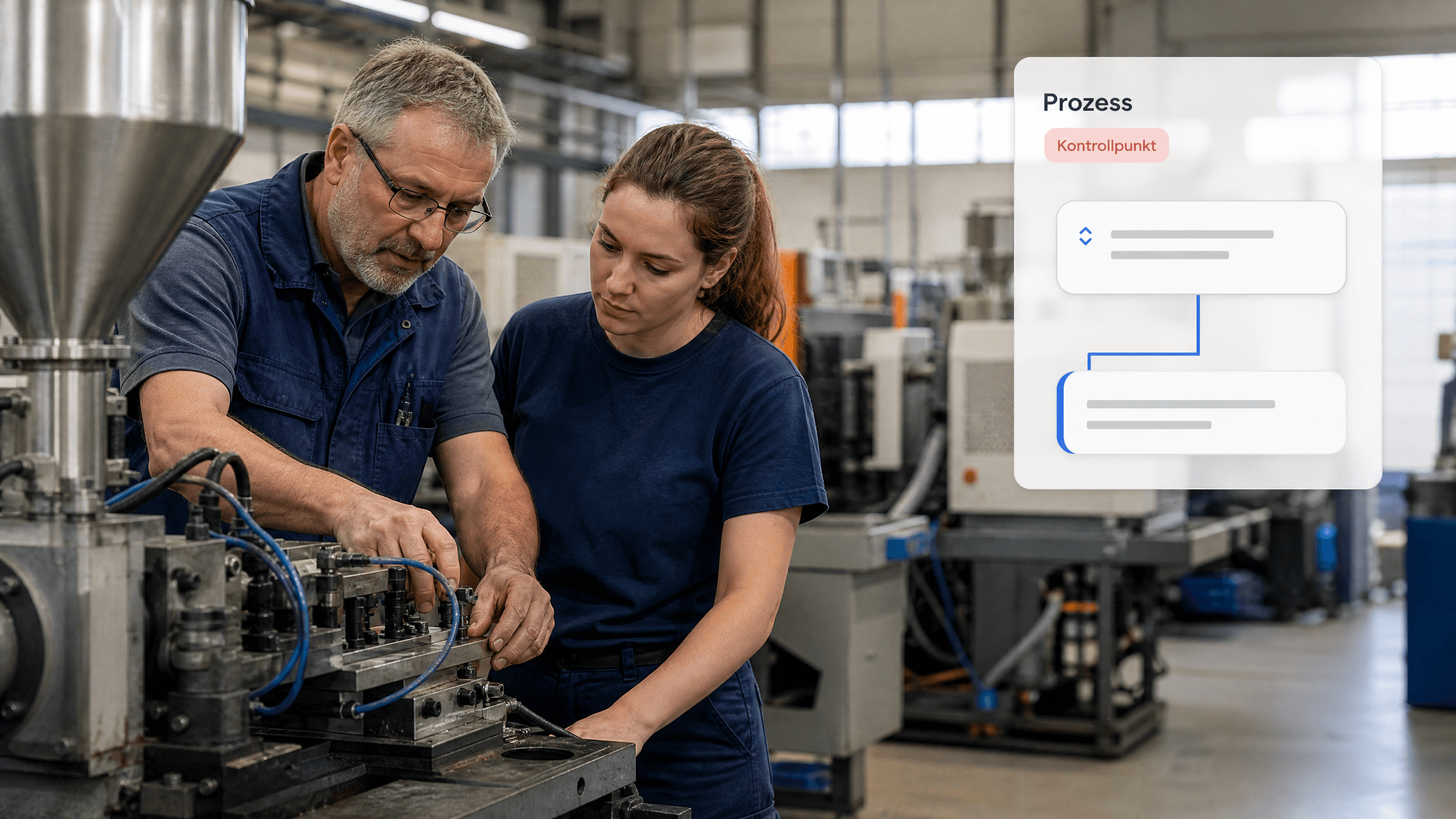
The oldest machine on the shop floor never stays down for long, because Thomas knows exactly what to do when it breaks down. What happens when Thomas retires? Many companies know this situation: important workflows only work because individual people carry them in their heads. Very little of it is written down.
Good process documentation makes this knowledge independent of individual people, so the workflow still works when Thomas is not around. In this article, you will learn what makes good process documentation, which methods exist and what it should include. We also show you how to create it in 5 steps and keep it up to date.
What is process documentation?
Process documentation records how a workflow in a company works: who is involved, what happens in which order, where the checkpoints are and what the result is. This makes workflows visible, verifiable and transferable, no matter who is on shift.
The purpose is always the same: knowledge that so far only exists in individual heads should become usable for everyone. In daily operations, this pays off in many places. New employees get up to speed faster, a process runs the same way on every shift, and during an audit (e.g. as part of ISO 9001) you can show how you actually work. At the same time, documentation is the basis for improving workflows in the first place.
All kinds of workflows can be documented. Usually, three types of processes are distinguished: core processes, which create direct value for customers, for example in production, management processes, which steer the company, and support processes such as purchasing or maintenance, which keep the core processes running. Troubleshooting a machine is therefore a support process.
A few closely related terms come up around the topic:
- Process description: a single document that describes one process. Process documentation is the umbrella term for all documents and formats used to record workflows.
- Process manual: the collection of all process descriptions in a company.
- Work instruction: the detailed guide for a single task within a process, for example setting up a machine.
The difference from a work instruction lies mainly in the level of detail. Process documentation shows the entire workflow with all participants and handovers, while a work instruction goes down to the individual hand movement at a workstation. The two complement each other: process documentation defines who does what and when, and for the critical tasks within it, a work instruction describes exactly how it is done.
Why undocumented processes get expensive
As long as everyone involved is around, the lack of documentation is barely noticeable. The workflow works because someone knows how it is done. It only gets expensive at the moments when exactly this knowledge is missing:
- An audit is coming up: You cannot prove how a process runs.
- Someone is absent: Vacation, illness or resignation, and nobody knows how to continue.
- New employees start: Without documentation, onboarding takes longer and ties up experienced colleagues.
- Mistakes keep happening: Without a defined workflow, every shift does it differently.
- You want to improve something: What is not described can hardly be compared or measured.
All these situations have one thing in common: the knowledge exists in the company, but not where it is needed at that moment. This costs time, and often quality and nerves as well. Depending on who will use the documentation later, there are different methods for capturing this knowledge.
Process documentation methods compared
There is no single right way to document processes. What matters is who will use the documentation later and for what: management needs a quick overview and the confidence to pass the next audit, IT needs an exact model, and the person at the machine needs instructions they can understand during operation. The table compares the most common methods:
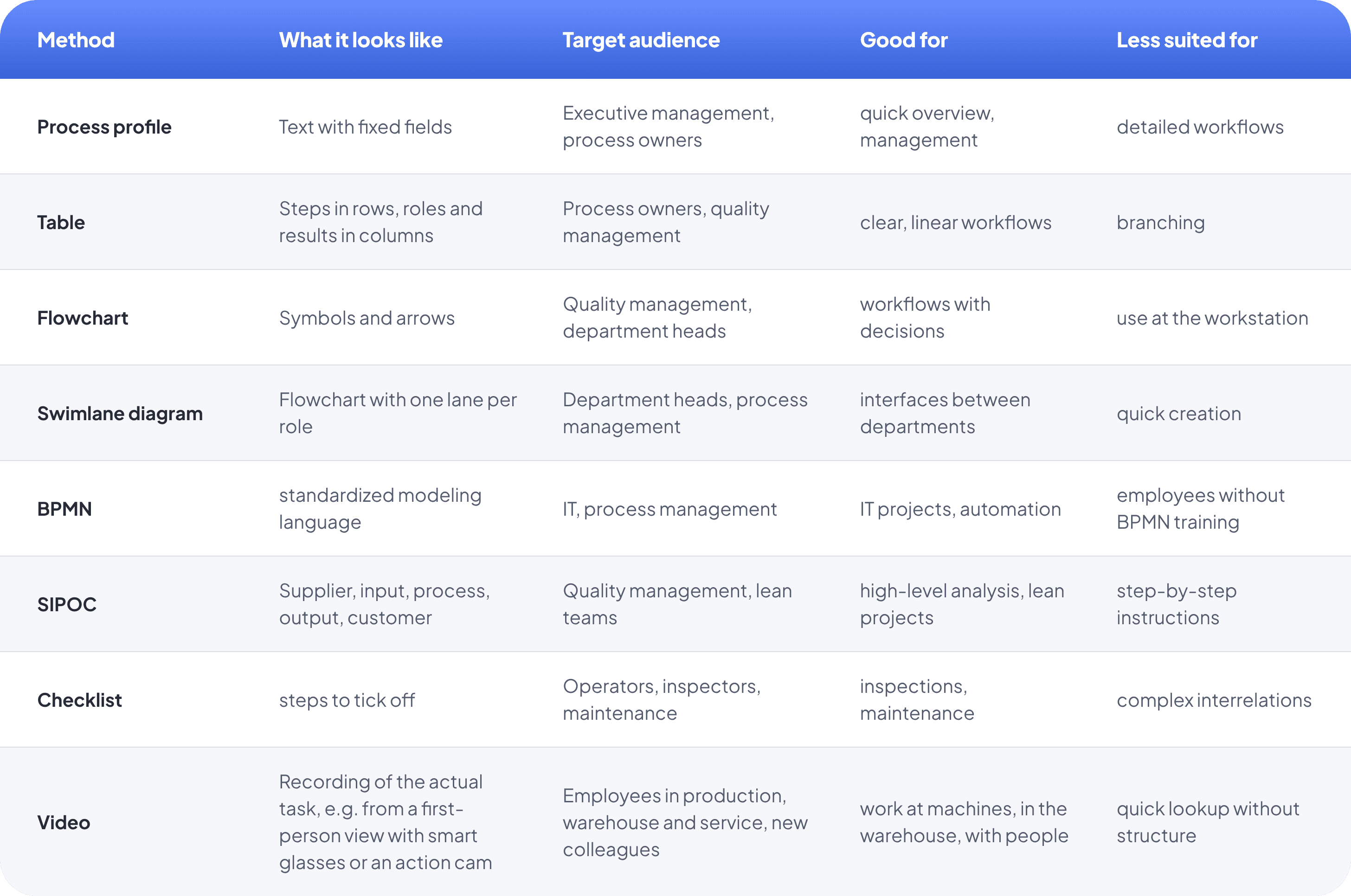
For office processes involving many departments, swimlane diagrams or BPMN are a good fit because they make handovers between roles clearly visible. For operational teams, something else matters: the documentation has to be understandable at the workstation, often right at the machine and under time pressure. Checklists, images and videos work best there.
The same applies to the question of which software is suitable. For modeling and IT processes, there are specialized BPM tools that let you map workflows in great detail. For operational teams that carry out workflows directly at the machine, in the warehouse or at the customer site, you need software that delivers instructions on mobile devices and records evidence at the same time, for example the SOP-Builder from Elephant. There, employees carry out a process step by step in the app on a smartphone, tablet or browser and capture photos, signatures or measurements directly in the workflow. This documents who carried it out, and measurements can be transferred to your ERP or CRM.
What process documentation should include
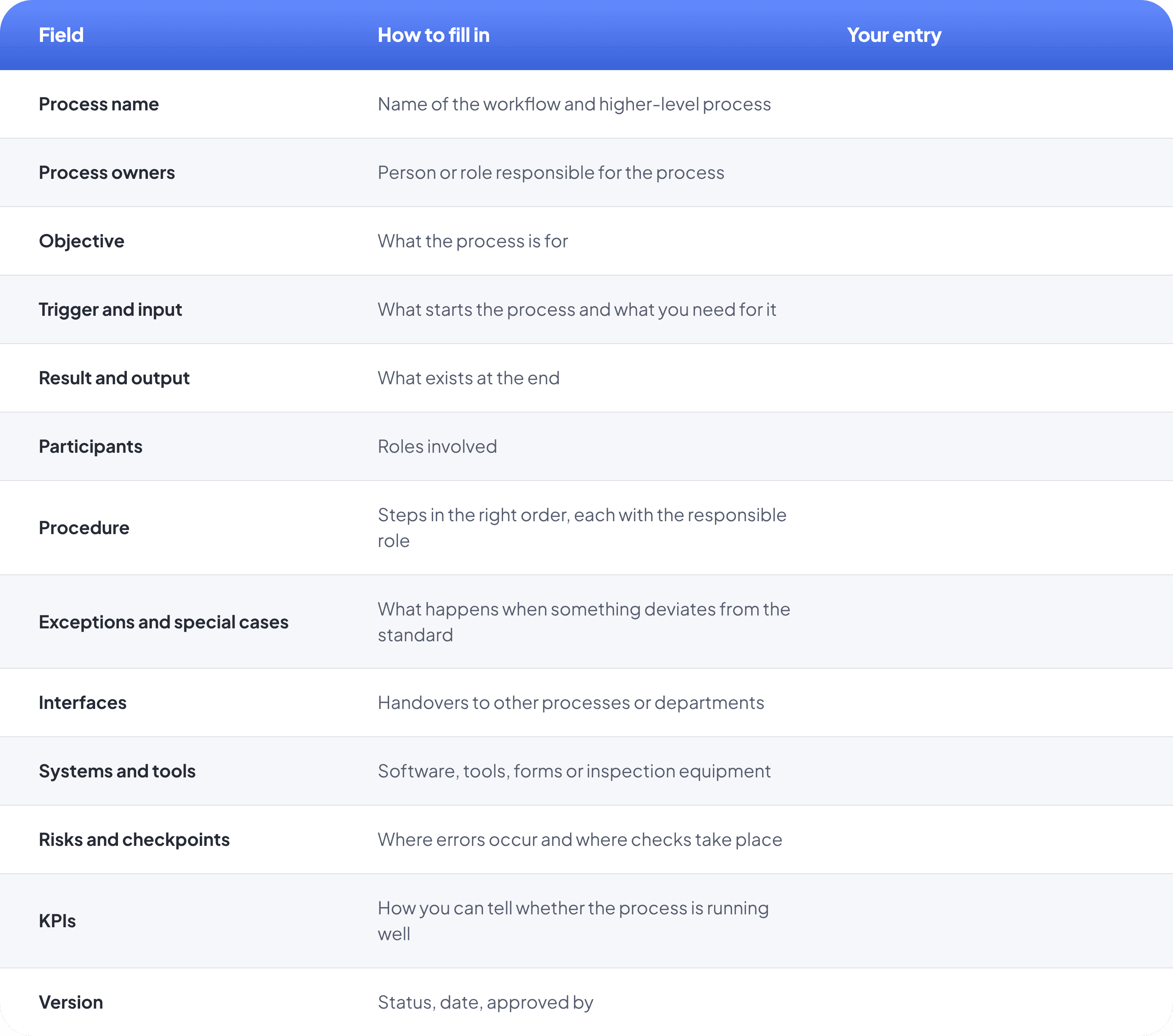
Whichever method you choose: a process description used by process owners, quality management and auditors always answers the same core questions. For the operational employees who carry out the workflow, the most important ones are the workflow, the participants and the checkpoints. How a single task is done in detail belongs in the work instruction.
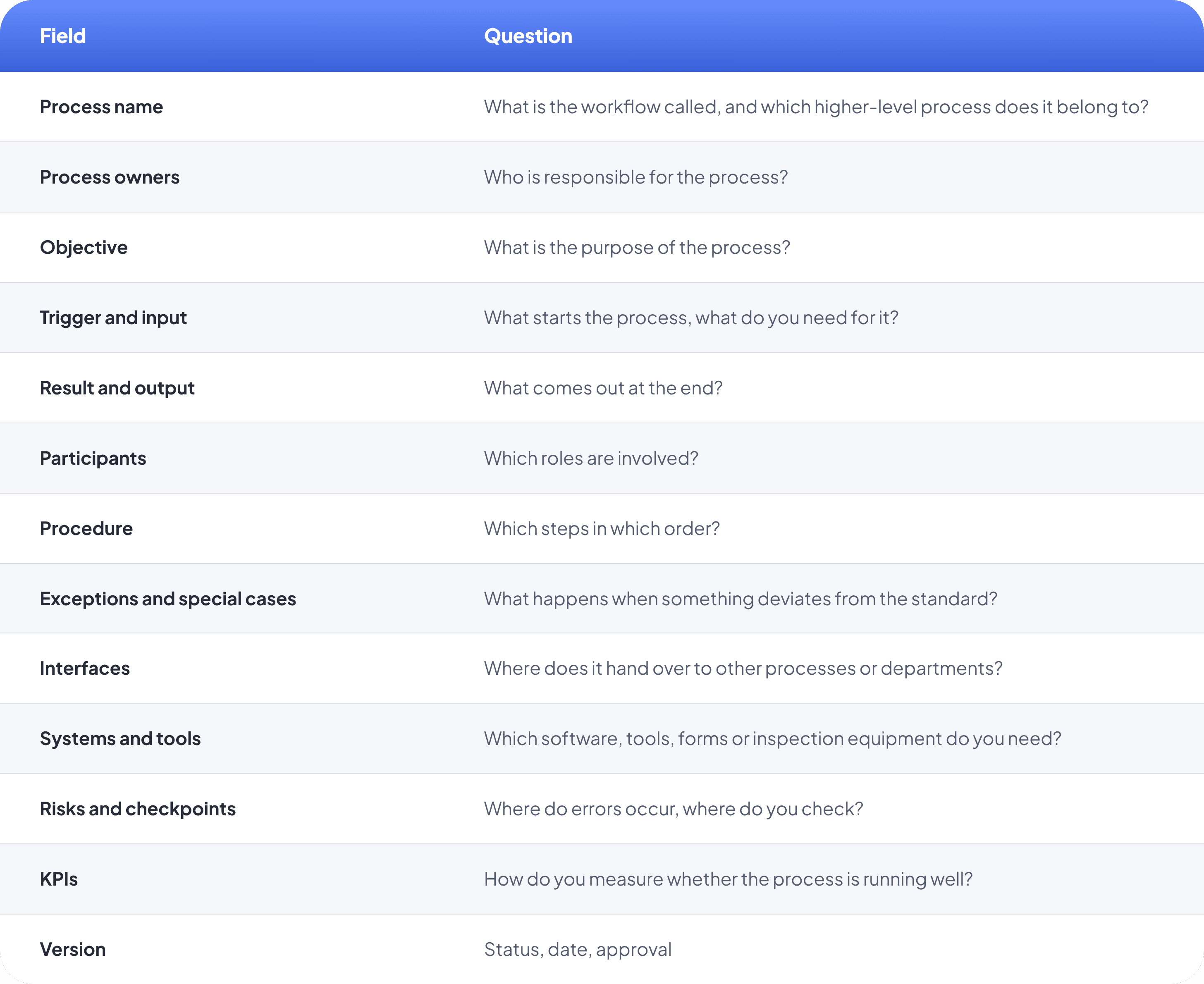
Not every field has to be long. For simple processes, one or two sentences are often enough. What matters most is that the workflow, responsibilities and checkpoints are clear.
How to create process documentation in 5 steps
Process documentation is not created at a desk alone, but in conversation with the people who know the workflow. These five steps take you from the first idea to approved documentation:
1. Define the goal and scope
First, clarify with your team, or at least for yourself, what the documentation is for: onboarding, an audit or as a basis for improving the workflow? The purpose determines how detailed you need to be. Also define where the process starts and where it ends. Troubleshooting, for example, starts with the fault report and ends when the machine is running again. This keeps a single process from turning into an entire manual. If you do not know where to start yet: begin with a manageable workflow to try out the method. Then move on to the workflows that cause the most errors or questions, where staffing changes frequently or that depend on a single person.
2. Capture the current process
Document how the process actually runs today, not how it should run. Talk to the people who carry it out and watch them on site. That is where the small deviations and tricks show up that are not written in any document. A video recording saves you a lot of time, because you do not have to ask about every detail later. Ideally, film from a first-person perspective, for example with smart glasses or an action camera such as a GoPro. That way, the video shows exactly the perspective of the person doing the work, who keeps both hands free for the task.
3. Choose a method
Choose the documentation method based on the target group. For management, a process profile is often enough, while operational employees at the machine need steps with images. In many cases, you combine both: an overview of the entire workflow plus work instructions for the critical tasks.
4. Review, approve and make available
Have the draft reviewed by those involved, ideally by the people who carry out the workflow every day. If the workflow and the document differ, find out why before you approve the document. Sometimes the process documentation is inaccurate, sometimes a shortcut has crept into daily work that you should regulate deliberately. Only then does the responsible person approve the documentation. Afterwards, decide where the documentation is stored and how your team finds it: in a central location, with consistent file names and accessible where the work happens, for example via a QR code on the machine or in an app. Documentation that nobody can find will not be used.
5. Maintain it
Appoint a responsible person and schedule fixed review dates, for example once a year and additionally after every change to equipment, materials or responsibilities. Every change to the workflow gets a new version, so everyone knows which version applies. You can read how this works in practice in the section on keeping documentation up to date below.
Example: process documentation for troubleshooting a machine
Imagine a mid-sized manufacturer of plastic parts that runs three shifts. Thomas has been a shift supervisor there for many years. Machine 4 is the oldest machine on the shop floor. For the typical faults, Thomas knows immediately what to do, and the machine is running again within a few minutes.
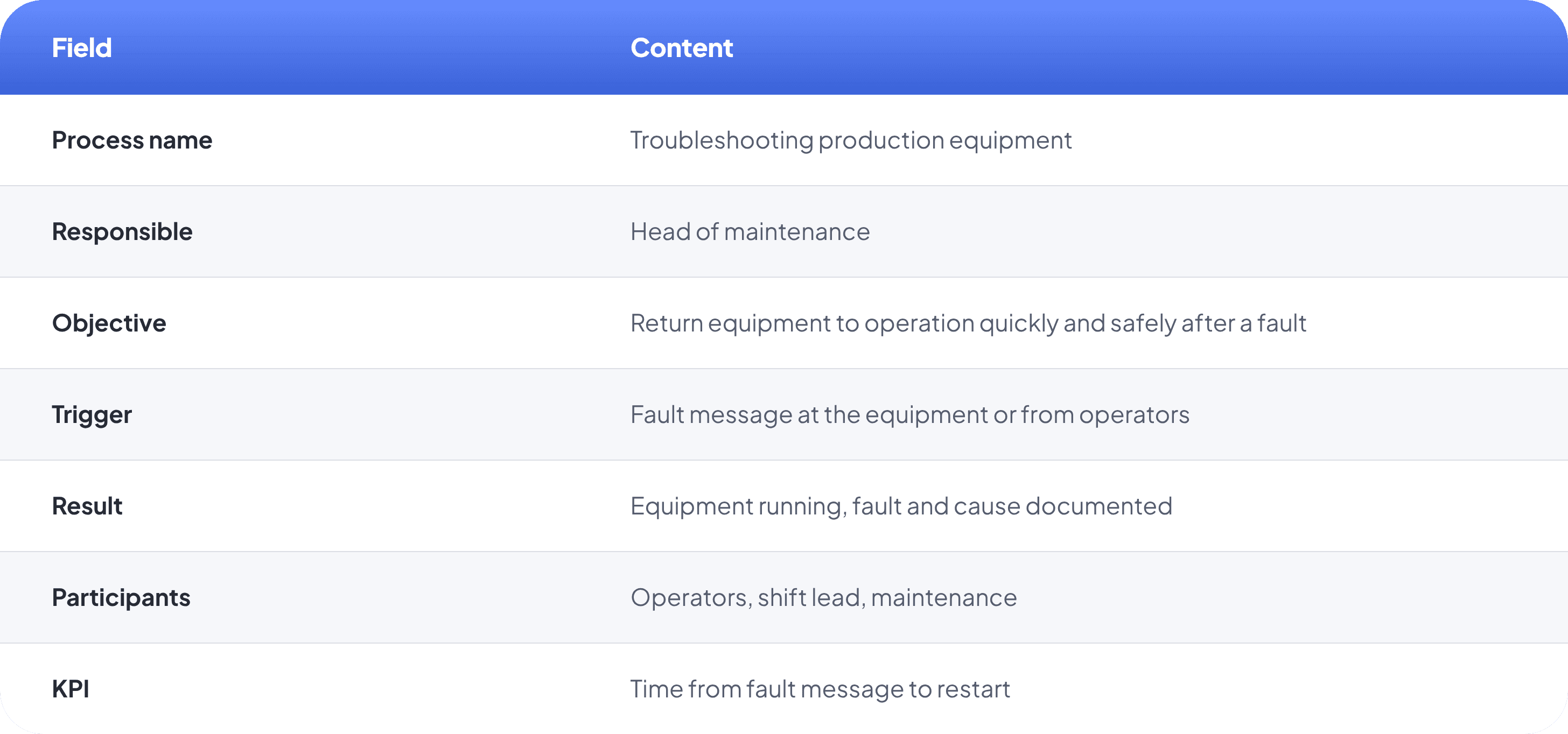
On the other shifts and during his vacation, things look different. Several times, machine 4 was down much longer than necessary because nobody knew what to do and maintenance had to come out for every small issue. Since Thomas will retire in two years, the head of maintenance documented the workflow together with him and the operators. You can see the result here.
The example is fictional. Adapt the roles and times to your own operation.
Workflow
- Operators: Stop the machine, secure it and report the fault to maintenance with a photo.
- Shift supervisor: Decides whether production should switch to another machine.
- Shift supervisor: Checks whether it is a known fault and fixes it according to the work instruction. For unknown faults, maintenance takes over.
- Shift supervisor or maintenance: Releases the machine and documents the cause and the measures taken.
- Operators: Start the machine and check the first parts.
Checkpoint: Nobody restarts the machine without release.
Interface: If spare parts are needed, the workflow is handed over to purchasing.
With this documentation, troubleshooting no longer depends on a single person. Anyone standing in front of machine 4 at night can see immediately which faults they can fix themselves, how to do it, and when maintenance takes over. Thomas passes on his knowledge while he is still in the company, and the KPI shows the head of maintenance right away whether downtime is actually getting shorter.
Template: process documentation to copy
With this template, you can get started right away. Copy the table into your own document and fill in the right-hand column for your process. The instructions show you what belongs in each field.
Documenting processes with video and structuring them with AI
The most time-consuming step is almost always capturing the process. Interviews, workshops and notes take days, and in the end, exactly the hand movements that matter are often missing. Anyone who has ever had to describe a workflow from memory knows this. A video of the task during operation, recorded from a first-person perspective with smart glasses or an action camera, shows exactly what happens: every hand movement the way experienced colleagues do it, without them having to interrupt their work.
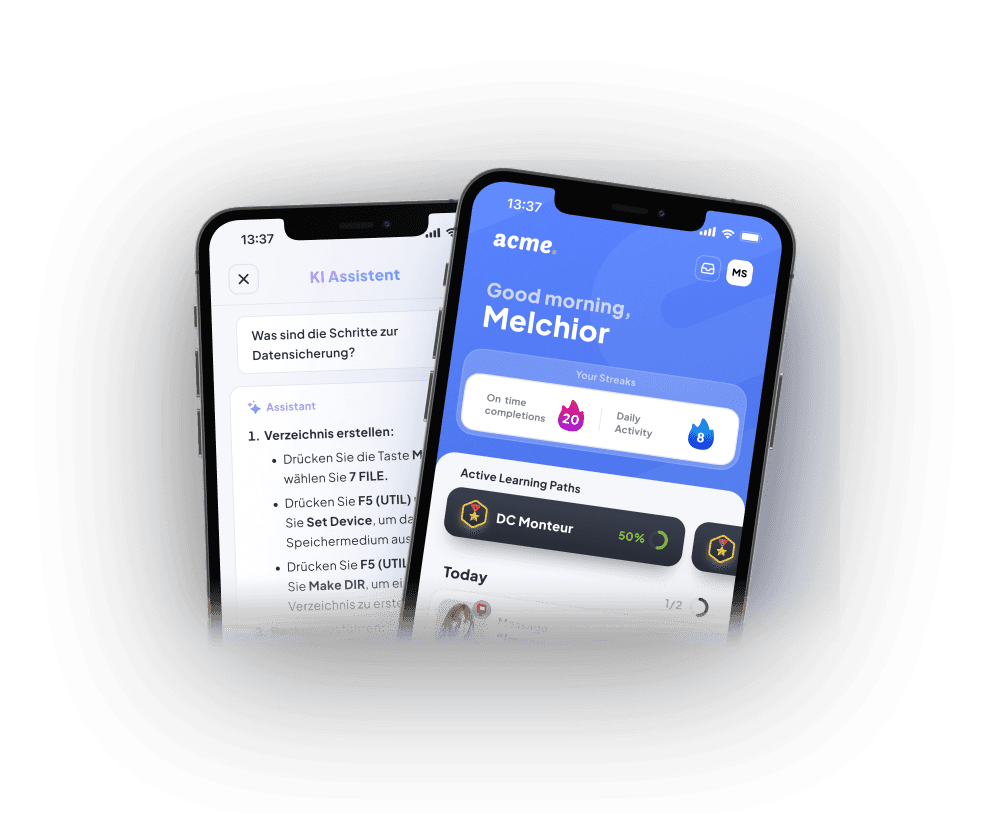
With the SOP-Builder from Elephant, you upload a video like this. The AI creates a structured draft with steps, which you review and complete. This gives you a first version of the documentation in a short time, even for workflows that so far only exist in the heads of experienced colleagues. The result is more than a document. Employees open the workflow on a smartphone, tablet or desktop, in their own language and with images at every step. You maintain changes centrally, so all employees immediately work with the latest version. If you also need paper, you can print the workflow or save it as a PDF. The principle of creating an SOP with AI always stays the same: the AI delivers the draft, and your team’s expertise turns it into reliable instructions.
Document processes with video instead of taking notes
Upload a video of the task and get a draft with work steps. Try the SOP-Builder free for 14 days and see how you can use it to create work instructions and checklists.
Common mistakes in process documentation
These three mistakes are the most common reasons why process documentation does not work in daily operations:
- Too much detail. If you write every hand movement into the process description, it becomes hard to follow. The overall workflow belongs in the process documentation, the individual hand movements in the work instruction.
- No responsible person. Without clear ownership, nobody notices when the workflow changes, and the documentation goes out of date without anyone noticing.
- Nobody uses the documentation. If it sits in a folder that nobody opens at the workstation, it has no effect. It has to be available where the work happens and written so that employees understand it without asking.
Keeping process documentation up to date
Outdated documentation is more dangerous than none at all, because inexperienced new colleagues in particular trust it, even when the workflow has long since changed. Four simple rules help you prevent this:
- One responsible person per process. They notice when something changes.
- Record changes immediately. New machine, new material, new role: the documentation is updated right away.
- Fixed review dates. For example, once a year, even if nothing seems to have changed.
- Feedback from the team. Employees report when the document and practice differ.
How often you review depends on how quickly a workflow changes. More important than the exact rhythm is that someone is responsible and takes feedback from the field seriously. Especially when experienced colleagues like Thomas retire in the coming years, it pays to start now, because every departure risks a loss of knowledge that you can hardly make up for later.
Document workflows where the work happens
With the SOP-Builder, your employees carry out workflows step by step in the app and capture photos, signatures and measurements directly. We will show you how it works for your specific use case.