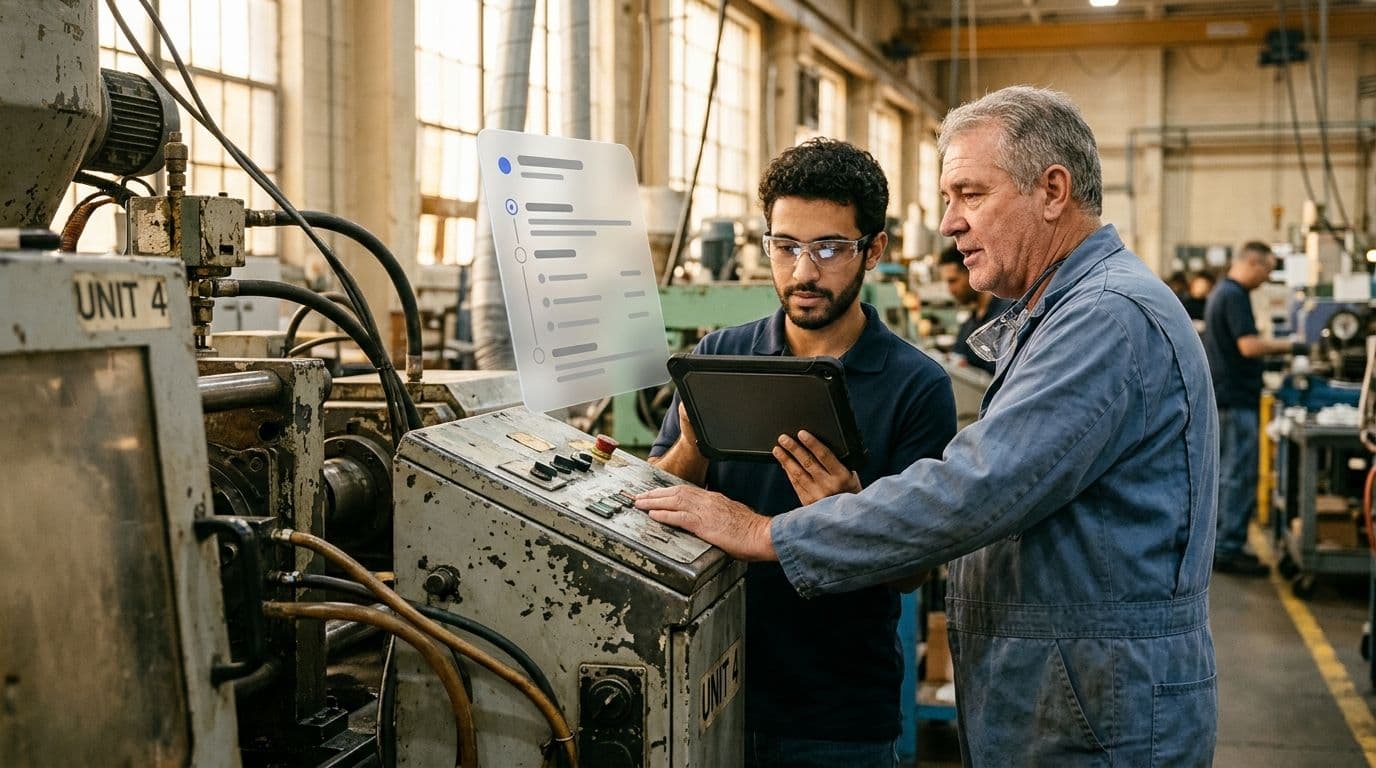
Machine 4 is never down for long, because Thomas knows the moves that fix the faults on this ageing machine. But what happens when Thomas retires? Many companies know this situation: important workflows only work because individual people carry them in their heads, and very little of it is written down.
Good process documentation makes this knowledge independent of individual people, so the workflow still works when Thomas isn’t around. In this article, you’ll learn what process documentation is, which methods exist and what belongs in it. We’ll also show you how to create it in 5 steps and keep it up to date. Using Machine 4 as an example, you’ll see what finished process documentation looks like.
What is process documentation?
Process documentation records how a workflow in your company works: who is involved, what happens in which order, where the checkpoints are and what the result is. It makes workflows visible, verifiable and transferable, no matter who is on shift.
The purpose is always the same: knowledge that has so far lived in individual heads should become usable for everyone. In day-to-day work, this pays off in many places. New employees get up to speed faster, a workflow runs the same way on every shift, and during an audit (e.g. for ISO 9001) you can show how you actually work. Documentation also lays the foundation for improving workflows in the first place.
You can document very different kinds of workflows. They are usually grouped into three process types:
- Core processes create value for customers directly, such as manufacturing.
- Management processes steer the company.
- Support processes, such as purchasing or maintenance, keep the core processes running.
Fixing faults on Machine 4 is therefore a support process.
A few closely related terms come up around this topic:
- Process description: a single document that describes one process.
- Process manual: the collection of all process descriptions in a company.
- Work instruction: detailed guidance for a single task within a process, such as setting up a machine.
The difference from a work instruction is mainly the level of detail. Process documentation shows the entire workflow with everyone involved and every handover. A work instruction goes down to the individual hand movement at a single workstation. The two complement each other: process documentation defines who does what and when, and for the critical tasks in it, a work instruction explains exactly how to do them.
Why undocumented processes get expensive
As long as everyone involved is around, missing documentation hardly gets noticed. The workflow works because someone knows how it’s done. It only gets expensive in the moments when exactly that knowledge is missing:
- An audit is coming up. You can’t prove how a process runs.
- Someone is absent. Vacation, illness or resignation, and nobody knows how to continue.
- New employees start. Without documentation, onboarding takes longer and ties up experienced colleagues.
- The same mistakes keep happening. Without a defined workflow, every shift does it differently.
- You want to improve something. What isn’t described can hardly be compared or measured.
All these situations have one thing in common: the knowledge exists in the company, just not where it’s needed right now. That costs time, and often quality and nerves too. How you capture this knowledge depends on who will use the documentation later, and there are different methods for that.
Process documentation methods compared
There is no single right way to document processes. What matters is who will use the documentation and for what:
- Management needs a quick overview and the confidence that the next audit will be passed.
- IT needs a precise model.
- The person at the machine needs instructions they can follow while production is running.
The table compares the most common methods:
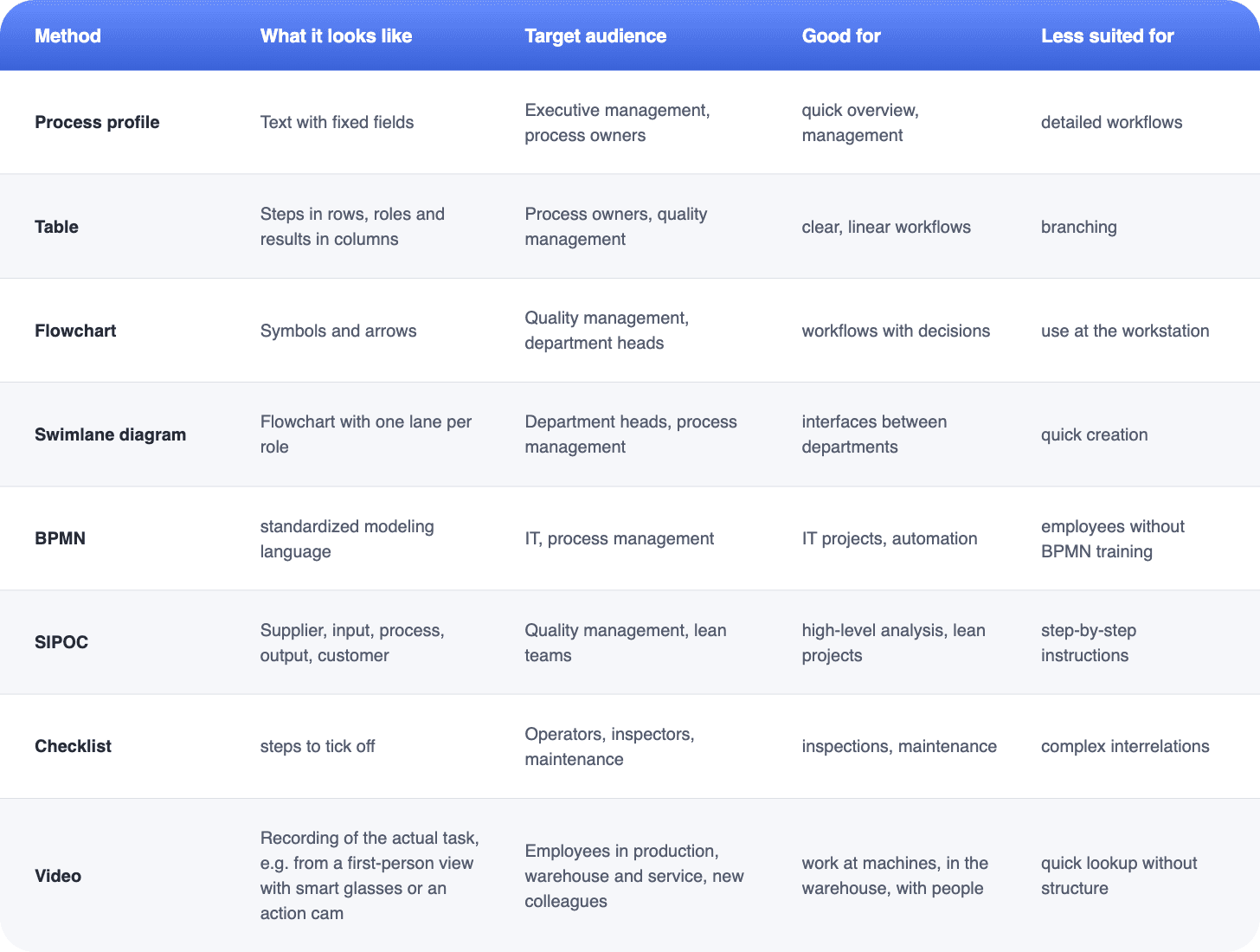
For office processes involving many departments, swimlane diagrams or BPMN work well because they make handovers between roles clearly visible. Operational teams need something different: the documentation has to make sense at the workstation, often right at the machine and under time pressure. That’s where checklists, images and videos work best.
The same applies to choosing software. For modeling and IT processes, there are specialized BPM tools that let you map workflows in great detail. For workflows at the workstation, you need software that delivers instructions on mobile devices and captures proof at the same time, such as Elephant’s SOP Generator. Employees follow a workflow step by step in the app on a smartphone, tablet or browser and capture photos, signatures or measurements directly within the workflow. That way, it is documented who carried out a workflow, and measurements can be exported as a CSV file, for example for your ERP system.
Document workflows where the work happens
With the SOP Generator, your employees follow workflows step by step in the app and capture photos, signatures and measurements on the spot. We’ll show you how it works for your own use case.
What belongs in process documentation
Whichever method you choose, a process description used by process owners, quality management and auditors always answers the same core questions. For employees at the workstation, the most important parts are the workflow, the people involved and the checkpoints. How a single task is done in detail belongs in the work instruction.
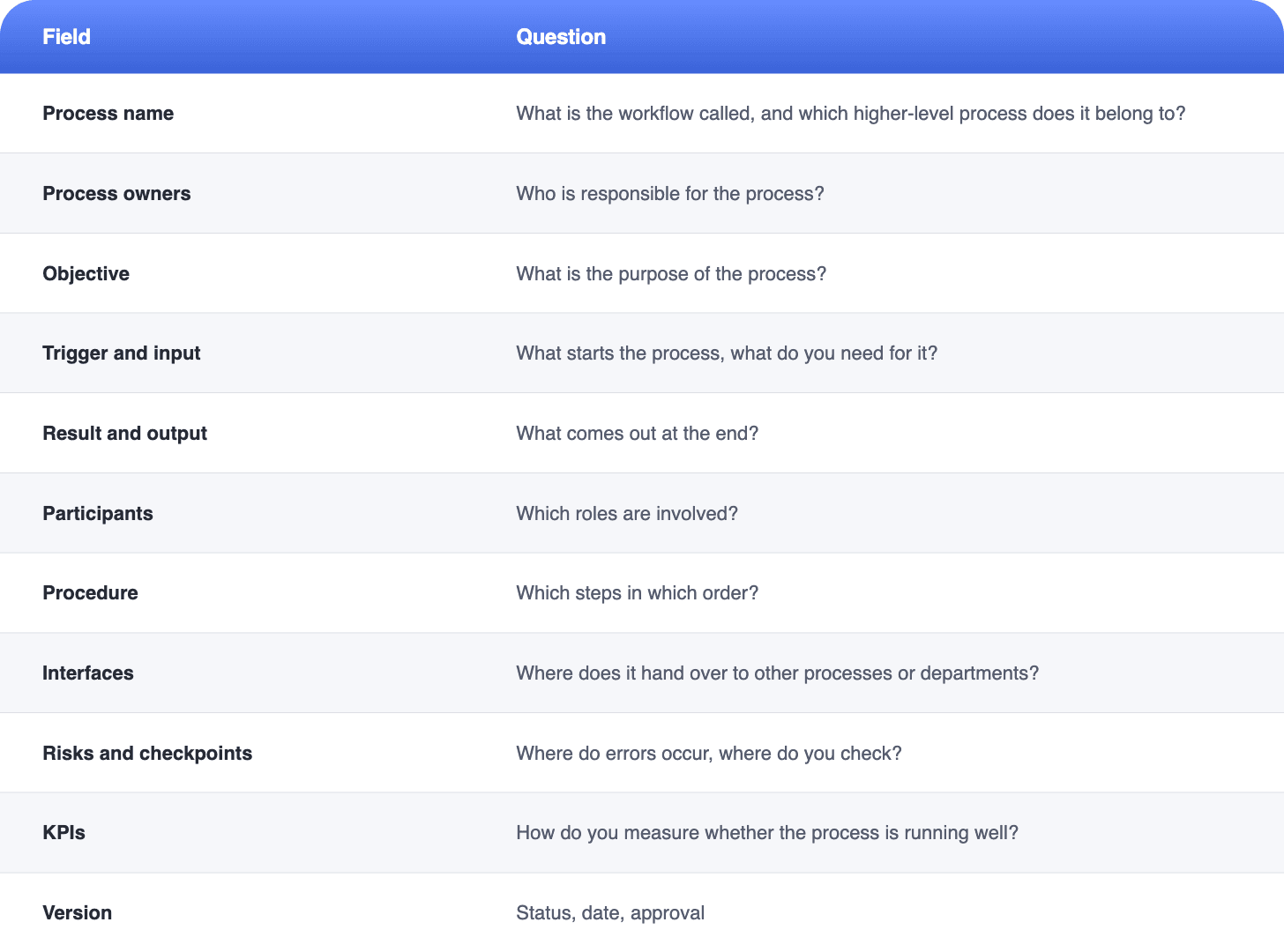
Not every field has to be long. For simple workflows, one or two sentences are often enough. What matters most is that the workflow, responsibilities and checkpoints are clear.
How to create process documentation in 5 steps
Process documentation isn’t written at a desk alone. It comes out of conversations with the people who know the workflow. These five steps take you from the first idea to approved documentation:
1. Define the goal and scope
First, clarify with your team, or at least for yourself, what the documentation is for: onboarding, an audit, or a basis for improving the workflow? The purpose determines how detailed you need to be. Also define where the process starts and where it ends. Fixing a fault, for example, starts with the fault report and ends when the machine is running again. This keeps a single process from turning into an entire manual.
Not sure where to start? Pick one of these workflows:
- the one that causes the most errors or questions
- one where staffing changes often
- one that depends on a single person
2. Capture the current process
Document how the process really runs today, not how it should run. Talk to the people who carry it out and watch them on site. That’s where the small deviations and tricks show up that aren’t written in any document. A video of the real work saves a lot of time, because you won’t have to ask about every detail later. Ideally, film from a first-person view, for example with smart glasses or an action camera like a GoPro. That way, the video shows exactly what the person sees, and they keep both hands free for the work.
3. Choose the method
Choose the format based on the target audience. For management, a process profile is often enough. For the workstation, you need steps with images. In many cases, you’ll combine both: an overview of the entire workflow plus work instructions for the critical tasks.
4. Review and approve
Have the people involved review the draft, ideally those who carry out the workflow every day. If the workflow and the document don’t match, find out why before you approve it. Sometimes the document is inaccurate. Sometimes a shortcut has crept into daily work that you should deliberately address. Only then does the responsible person or team approve the documentation.
5. Maintain
Appoint a responsible person and decide when you’ll review the documentation. Every change to the workflow gets a new version, so everyone knows which version applies. You’ll find out how to make this work in practice in the section on keeping documentation up to date below.
Example: process documentation for fixing a machine fault
Back to Thomas and Machine 4. Imagine a mid-sized manufacturer of plastic parts that runs three shifts. Thomas has been a shift supervisor there for many years. Machine 4 is the oldest machine on the floor. When one of the typical faults occurs, Thomas knows right away which moves will fix it, and the machine is running again within minutes.
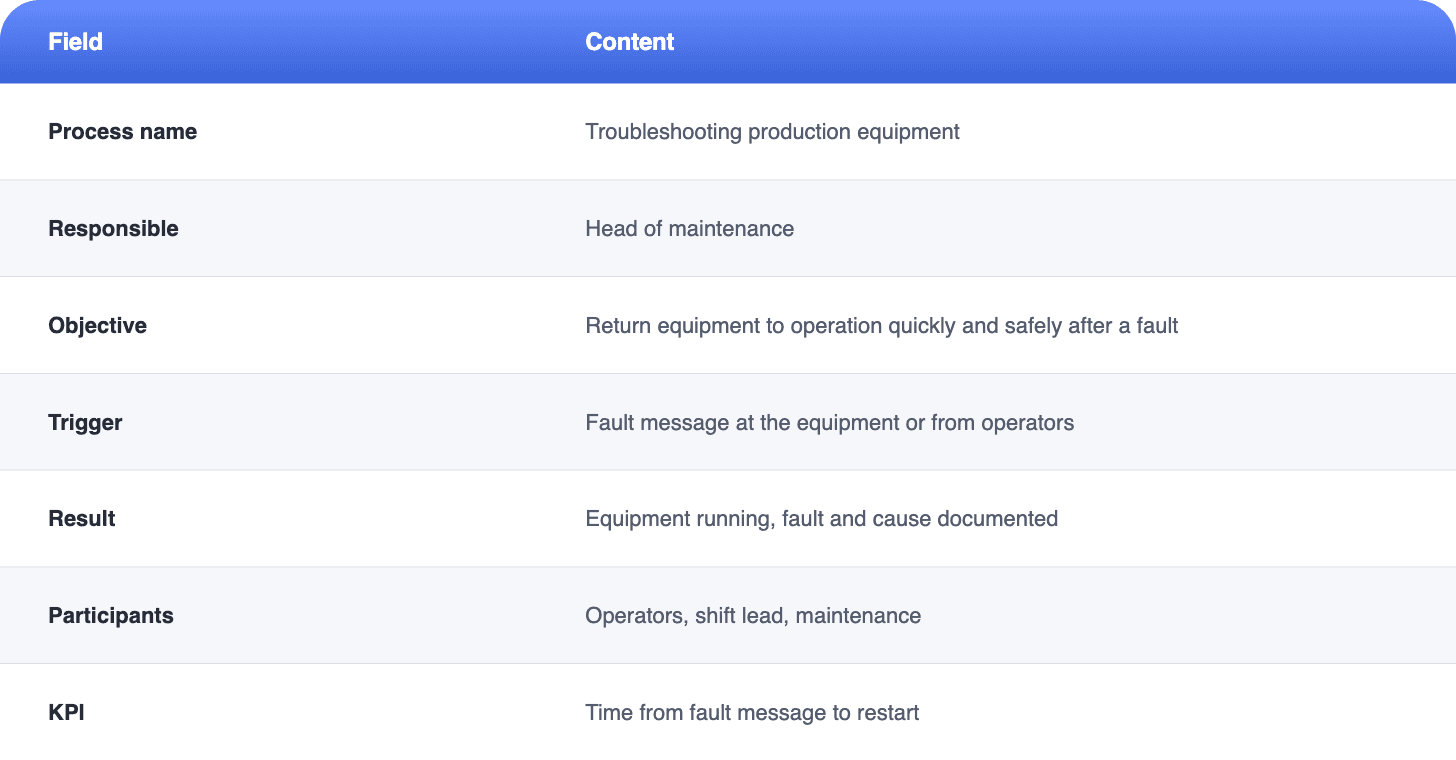
On the other shifts and while he’s on vacation, things look different. Several times, Machine 4 was down much longer than necessary, because nobody knew the right moves and maintenance had to come out for every little thing. Since Thomas is retiring in two years, the head of maintenance documented the workflow together with him and the machine operators. Here is the result.
The example is fictional. Adapt the roles and times to your company.
Workflow
- Machine operators: Stop the machine, secure it and report the fault to maintenance with a photo.
- Shift supervisor: Decides whether production switches to another machine.
- Shift supervisor: Checks whether it’s a known fault and fixes it according to the work instruction. For unknown faults, maintenance takes over.
- Shift supervisor or maintenance: Approves the machine for restart and documents the cause and the action taken.
- Machine operators: Restart the machine and check the first parts.
Checkpoint: Nobody restarts the machine without approval.
Interface: If spare parts are needed, the workflow passes to purchasing.
With this documentation, fixing faults no longer depends on a single person. Whoever is standing in front of Machine 4 at night sees right away which faults they can fix themselves, with which moves, and when maintenance takes over. Thomas passes on his knowledge while he’s still at the company, and the KPI shows the head of maintenance whether downtime is actually getting shorter.
Document processes on video and structure them with AI
Capturing the process is almost always the most time-consuming step. Interviews, workshops and notes take days, and in the end the hand movements that matter most are often still missing. Anyone who has ever tried to describe a workflow from memory knows this. A first-person video of the real work, recorded with smart glasses or an action camera, shows exactly what happens instead: every hand movement, just the way the experienced colleague does it, without her having to interrupt her work.
With Elephant’s SOP Generator, you upload a video like this. The AI turns it into a structured draft with steps, which you review and add to. That gives you a first version of the documentation quickly, even for workflows that have so far only existed in the heads of experienced colleagues.
The result is more than a document:
- Employees open the workflow on a smartphone, tablet or desktop, in their own language and with images for every step.
- You maintain changes centrally, so everyone works with the latest version right away.
- If you also need paper, you can print the workflow or save it as a PDF.
The principle of creating an SOP with AI stays the same: the AI delivers the draft, and your team’s expertise turns it into reliable instructions.
Document processes on video instead of taking notes
Upload a video of the task and get a draft with work steps. In a demo, we’ll show you exactly how the SOP Generator works.
Keeping process documentation up to date
Outdated documentation is more dangerous than none at all, because inexperienced new colleagues in particular trust it, even when the workflow has long since changed. Four simple rules help you prevent that:
- One responsible person per process. They notice when something changes.
- Update changes immediately. New machine, new material, new role: the documentation follows right away.
- Fixed review dates. For example, once a year, even if nothing seems to have changed.
- Feedback from the workstation. Employees report when the document and actual practice don’t match.
How often you review depends on how quickly a workflow changes. More important than the exact rhythm is that someone is responsible and takes feedback from the shop floor seriously. Especially when experienced colleagues like Thomas retire in the coming years, it pays to start now. Every departure risks a loss of knowledge that you can hardly make up for later.