A manufacturer of hydraulic cylinders assembles around 40 variants on the same line in Hall 2. For every order, production planning prints the production order from SAP: material numbers, operations, target times. Next to it sits a binder of work instructions, some laminated, some with notes added in ballpoint pen. Which seal goes into variant 17, and in which order, is not in either document. Only the colleague from the early shift knows. When that colleague is off sick, the late shift calls the shift supervisor or simply tries it out. The example is fictional, but in many companies it is everyday reality.
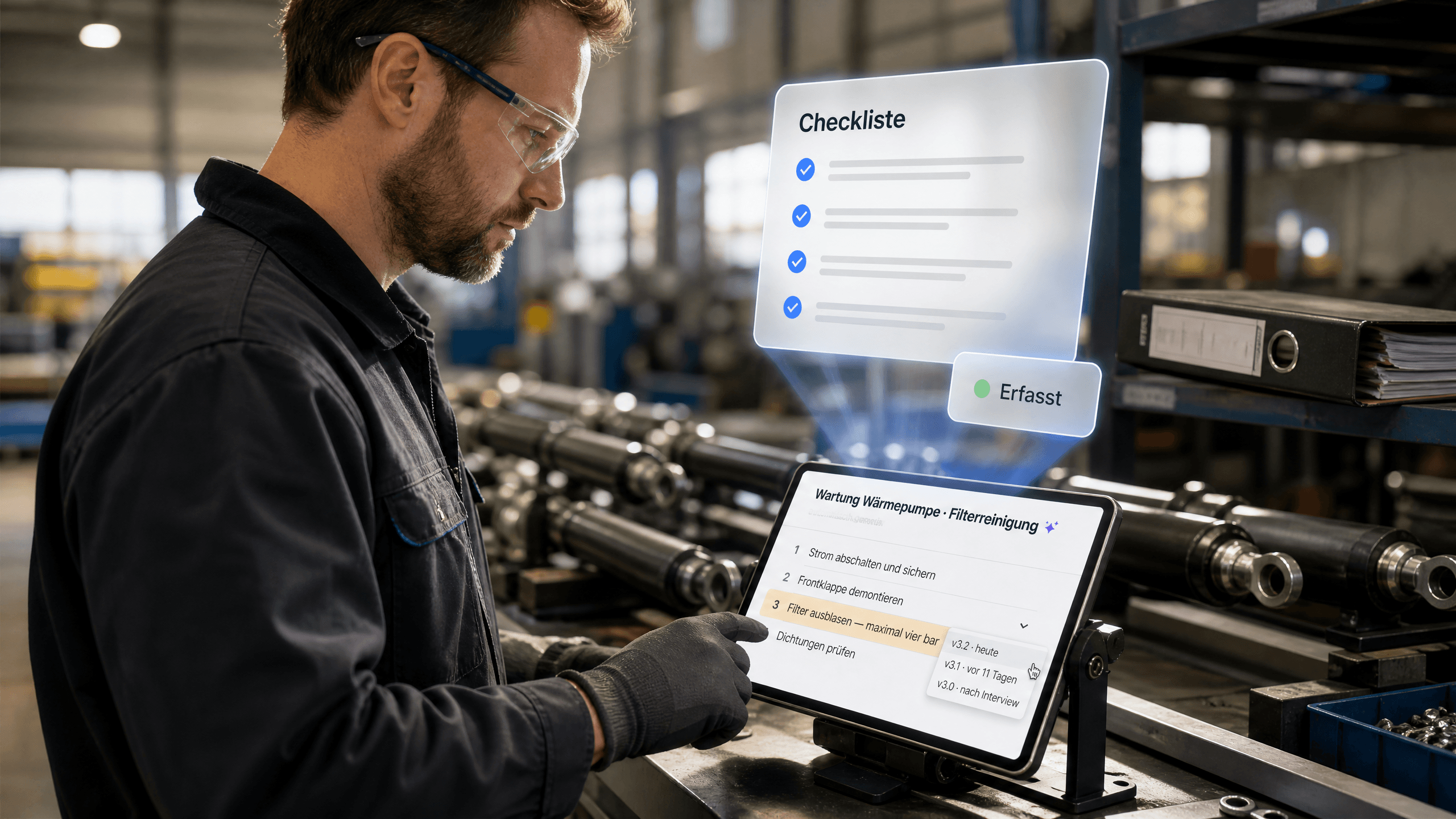
This is exactly where digital work instructions come in. They guide people step by step through the task, show every move with an image or video, and capture measurements, records and deviations right at the workplace. In this article you will learn how a digital work instruction differs from a PDF on a tablet, where paper and printed production orders reach their limits, what to consider regarding the works council and data protection, and how to make the switch in 4 steps.
What is a digital work instruction?
A digital work instruction describes how someone carries out a single task at a specific workplace. The difference from the paper version: it is easier to keep up to date because deviations are recorded centrally, changes are easier to communicate to everyone affected, and it actively supports people while they work. It does not sit in a binder but on a smartphone, a tablet or a screen next to the machine, and it actively guides people through the process instead of just describing it.
In practice, there are three levels:
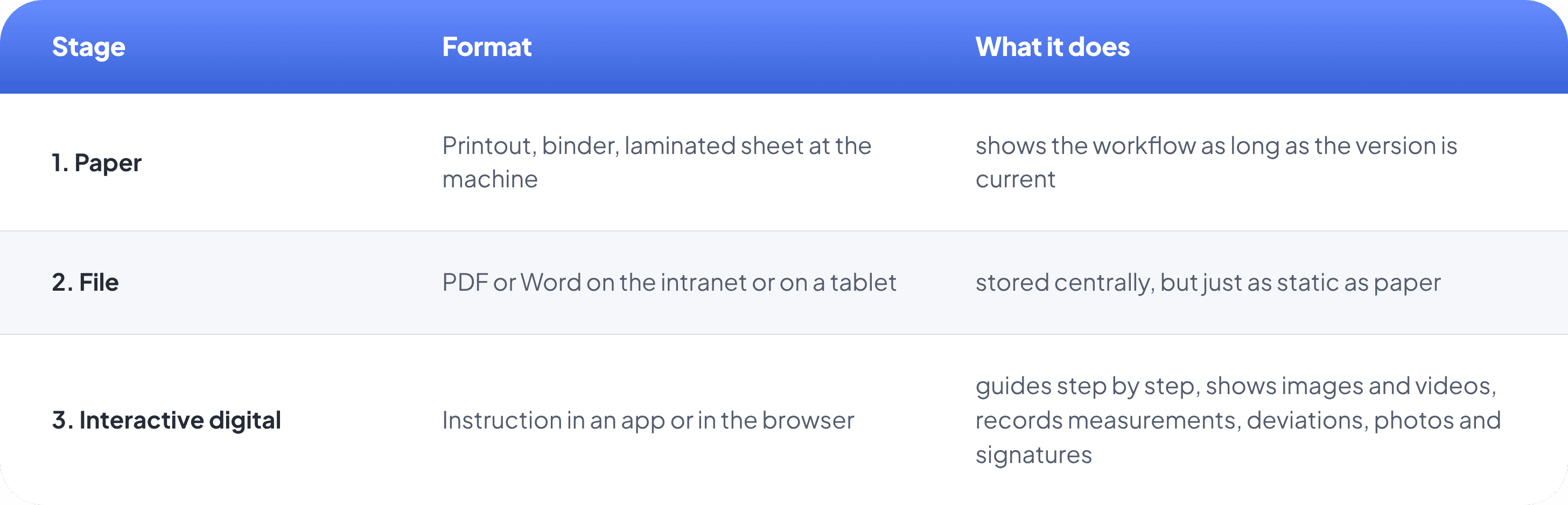
Many companies are at level 2 and are satisfied with this degree of digitization. A PDF on a tablet saves the printer, but it does not solve any of the problems that arise during the work itself: it does not ask for a measurement, offers no branching scenarios in case of errors and does not document deviations, let alone who carried out the step. When this article talks about digital work instructions, it means level 3. Our article How to write work instructions shows how to structure the content of a work instruction.
In this context you will often also hear the term digital worker guidance. It describes the same principle from the perspective of the person at the workplace: the system guides them through the process. In manufacturing, worker guidance is often part of a worker assistance system that also integrates hardware such as pick-by-light or projection.
Why paper and printed production orders are no longer enough
Paper is still more widespread in German companies than many think. According to a Bitkom survey of 1,103 companies with 20 or more employees, only 15 percent work completely paperless, and 38 percent still handle about half of their office and administrative processes on paper (Bitkom, September 2024). Admittedly, the figures are from 2024 and refer to the office. In production, warehousing and service, where work instructions are actually needed, our experience is that printouts are still used far more often.
The problem, of course, is not paper itself. Problems arise wherever the work changes faster than the document.
- Outdated versions: Every change means reprinting, replacing and hoping nobody keeps an old copy. If line 1 has version 3 and line 2 still has version 2, two shifts work according to two different processes.
- Variants: The more variants a company produces, the more sheets end up in the binder. Finding the right version for the current order takes time and leads to mix-ups. Changeovers in particular often require many different variants, depending on the specific workpiece or product, and the settings depend on numerous factors. That simply cannot be shown clearly on sheets of paper.
- The printed production order does not explain a single move: A production order or routing from the ERP, for example from SAP, says which operation is due with which material in which target time. How the person carries out the operation correctly, what to watch out for and what to do if something goes wrong is not in there. So far, this gap has mostly been filled by the knowledge of experienced colleagues.
- No proof: Paper shows how things should run, but not how they actually ran. Who carried out which step when and which value they measured ends up, at best, on a separate form that someone types up later. In an audit, the evidence is then missing.
- Only one language: If people from several countries work on one shift, not everyone understands the German instruction. Temporary workers and new employees then ask around or go by gut feeling.
All of these points have one thing in common: they do not arise when the instruction is written, but when it is distributed, maintained and used. That is exactly where a digital work instruction comes in.
What a digital work instruction can do
A digital work instruction does not just show the process, it actively supports teams as they carry it out. The most important functions at a glance:
- One valid version for everyone: If you change the instruction centrally, every workplace sees the new version immediately. There is no need to collect old printouts, and the change history shows what changed and when.
- Images and videos at each step: A short video shows a movement better than three sentences. The person sees the move exactly where they need it, instead of in a collection at the end of the document. This makes the instruction clearer and therefore more effective, especially for new employees.
- Input fields for records: The person captures measurements, photos and signatures directly in the process. It is also documented who carried out a changeover or inspection and when. The record is created at the same moment as the work, and data can be transferred to the ERP or CRM instead of being typed up from a form.
- Conditions and jumps: If a measurement is outside the tolerance, the instruction leads straight to the procedure for that error. If settings are tied to specific parameters, this can also be shown clearly.
- Process changes and updates: With the right system, deviations from digital work instructions automatically trigger a review and, if needed, the revision and approval of process changes to the SOP by the responsible process owners.
- Repetitions: Steps whose number varies, such as several pallets in goods receipt or several holes in one component, can be mapped easily and reliably.
- Targeted assignment: Through their login, each person receives the instructions that match their role, team or location. For example, you can specify that someone only receives the instruction for a particular machine after their briefing.
- Guide or checklist: Not every instruction is used the same way. A guide explains a rare task for reference, while a checklist leads step by step through a changeover, maintenance or inspection and records every step. The SOP example shows what both formats look like.
- Paper remains possible: Many companies still want a paper version for documentation under ISO 9001 or as a notice at the machine. A good solution therefore offers a print version or a PDF export. The standard itself does not prescribe a medium, so the digital version meets the same requirements.
Elephant’s SOP Builder includes these functions. The difference lies in creation: you film the task with your smartphone, and the AI turns the video into a draft with work steps that you review and complete. Employees open the right instruction directly via a QR code on the machine. New versions go through an approval process, and completed checklists are saved as reports with person, time, measurements and signatures, which you can also export as CSV.
Create digital work instructions from a video
Film the task with your smartphone, and the AI creates a draft with work steps. Try the SOP Builder free for 14 days.
Paper vs. digital compared
The differences show up above all in everyday work on the line. The following table compares the three levels:
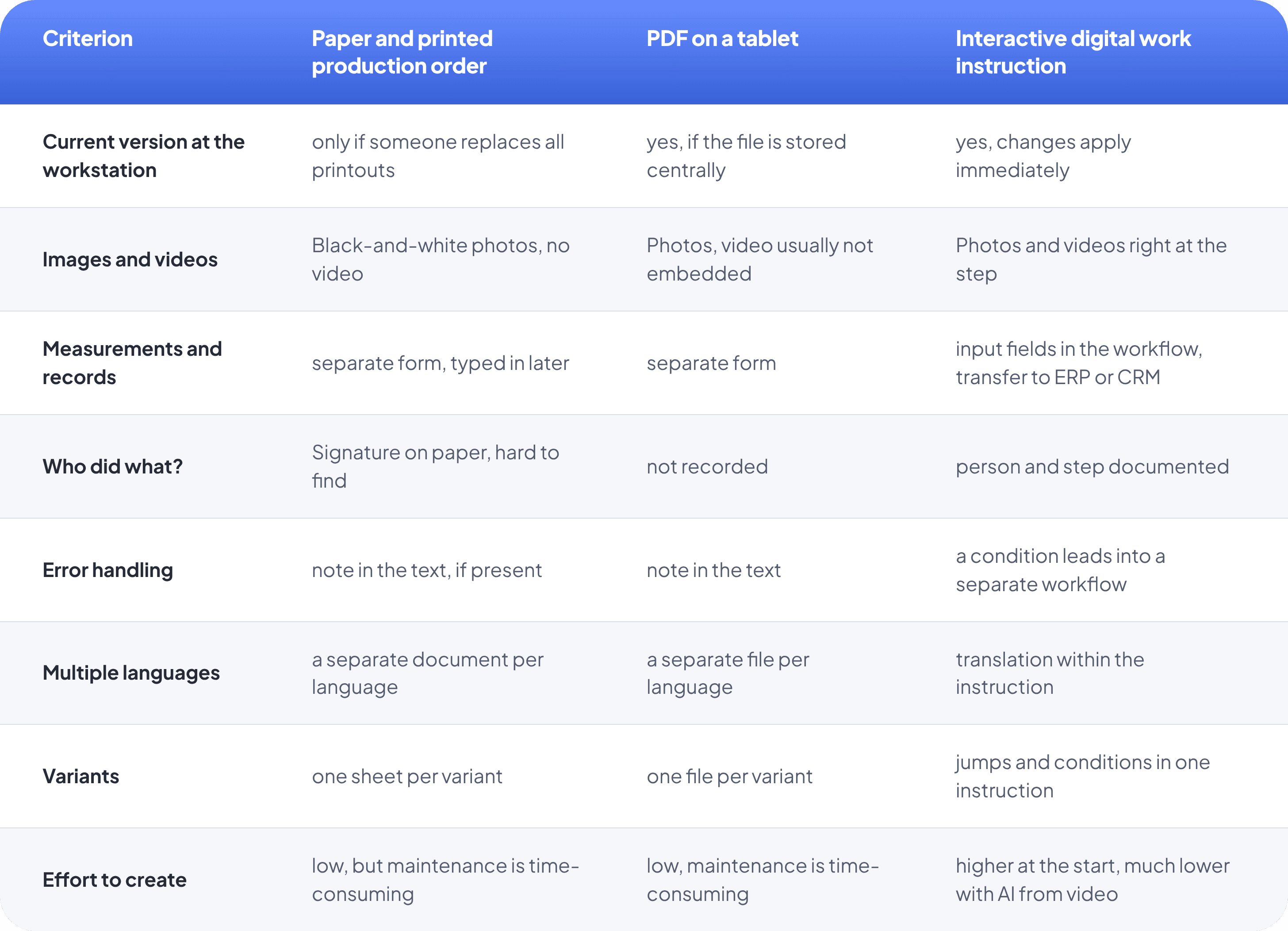
The table also shows where paper has its strengths: it needs no battery and no network. For a task that never changes, is carried out by one person in one language and requires no record, a good old sheet of paper is enough. In most companies, however, that applies to fewer and fewer tasks.
Multilingual teams: translation and consistent terminology
In many production and logistics companies, people with different native languages work on the same shift. An instruction only in German then does not reach everyone, and with every language on paper the maintenance effort doubles: if one step changes, every version has to be updated and redistributed.
Digital work instructions solve this on two levels. The translation is part of the instruction itself, each person opens it in their own language, and there are no longer separate documents that have to be replaced one by one. On top of that comes a glossary for technical terms. It ensures that a component has the same name in every language and in every instruction. Without a glossary, the “seal” in one instruction quickly becomes a “sealing ring” in the next, and new employees wonder whether these are two different parts.
A technical review remains important. Automatic translation usually handles everyday language well, but for technical terms and limit values it is worth having someone check who knows both languages and the task. Images and videos also help, because they work without language.
Works council and data protection: involve them early
This section refers to German law. As soon as software records who carried out which step and when, it is generally subject to co-determination. Under Section 87(1) No. 6 of the German Works Constitution Act (BetrVG), the works council has a say in technical systems that are designed to monitor employees’ behavior or performance. According to the case law of the Federal Labour Court (BAG), it is enough that software is objectively suitable for this, even if monitoring is not the goal at all. If the topic is only discussed shortly before rollout, the introduction can be delayed considerably.
If you involve the works council from the start, you make faster progress. You should clarify these points together and ideally record them in a works agreement:
- Purpose: The data serves as proof of quality and of instruction, not for performance monitoring.
- Roles and rights: Who sees which reports, and who does not?
- Retention period: How long is execution data stored?
- Video recordings: Anyone who appears in a video is informed in advance and agrees to the recording in writing.
- Hosting: Where is the data stored, and which certifications does the provider have?
Be sure to clarify these details early with your works council and, if necessary, with a specialist employment lawyer.
Introduction in 4 steps: pilot, processes, training, rollout
The switch should not start with all work instructions at once. A step-by-step approach has proven itself, in which, for example, the first line or the first plant shows as a lighthouse project what works before the rest follows.
1. Choose a pilot
Start with an area where the benefit becomes visible quickly: many variants, frequent questions, changing staff or documentation requirements. Define in advance how you will measure success, for example by the number of questions, the onboarding time of new employees or errors after a product change. In this step, also clarify the hardware: is a smartphone enough, or do you need tablets with a mount on the machine?
2. Capture processes
For the pilot area, choose the 5 to 10 tasks with the greatest impact. Instead of typing up old instructions one to one, record the task anew with a smartphone, smart glasses or, for example, a GoPro with a head mount: have the most experienced person film the work steps and explain out loud what they are doing. This way, the knowledge that so far has only been in their head also ends up in the instruction. With AI, the video becomes a draft that you review together, complete with images, input fields and checkpoints, and approve.
3. Train and brief
Show the team how to open and work through the instructions. This usually does not take long, because operation should be as simple as possible. Keep the instruction obligation under Section 12 of the German Occupational Safety and Health Act (ArbSchG) in mind: when employees are hired, when their tasks change and when new work equipment or technologies are introduced, you must instruct them on safety and health protection. If you record the briefing digitally, you have the proof right away.
4. Roll out and maintain
Once the pilot is running, transfer the approach to other lines and sites. Assign a responsible person to each instruction who updates it immediately when the machine, material or process changes. A fixed review date, for example once a year, is also worthwhile. This keeps the digital instruction as current as the work it describes.
How to recognize good software for digital work instructions
The market ranges from form apps to connected worker platforms to worker assistance systems with their own hardware. The SOP software comparison gives an overview of providers and categories. Regardless of the provider, these questions will help you choose:
- Creation: How quickly can interactive instructions be created? Can the software create a draft from a video or existing documents, or do you type every step yourself?
- Execution: Are there input fields for measurements, photos and signatures, conditions for error cases and repetitions?
- Devices: Does the instruction run on smartphone, tablet and desktop?
- Access: Can the digital work instructions also be opened without a login, and can the SOPs also be accessed via an AI assistant?
- Languages: Are there translations and a glossary for consistent technical terms?
- Document control: How do versions, approvals and change history work? This is exactly what auditors look at.
- Assignment: Can you control who receives which instruction by role, team or location?
- Knowledge and training: Can you turn an instruction into a training course and prove the briefing, or do you need a second system for that?
- Interfaces: Where does the captured data go, for example to the ERP or CRM?
- Data protection: Where is the data hosted, and which certifications such as ISO 27001 does the provider have?
- Paper as an option: Is there a print version or a PDF export for notices and audits?
Ideally, test the software with a real task from your company, not with a demo instruction from the provider. Only then will you see how long creation really takes and whether your team gets on well with it.
Turn your first paper instruction into a digital one
Upload a video of the task and get a draft with work steps that you review, complete and approve. We will show you using your own use case.