Anyone looking for an operator guidance system quickly ends up comparing apples and oranges. Laser projectors, pick-to-light shelves and tablet apps all count as worker assistance, but they solve different problems. The projector prevents errors at a fixed assembly station, while the app brings instructions to people who change where they work. Which type suits you therefore depends less on the provider and more on your workstation and on the problem you want to solve first.
In this article, you will learn what an operator guidance system is, which types exist and how they differ, which criteria to use when choosing one, and which 8 providers offer software and hardware.
What is an operator guidance system?
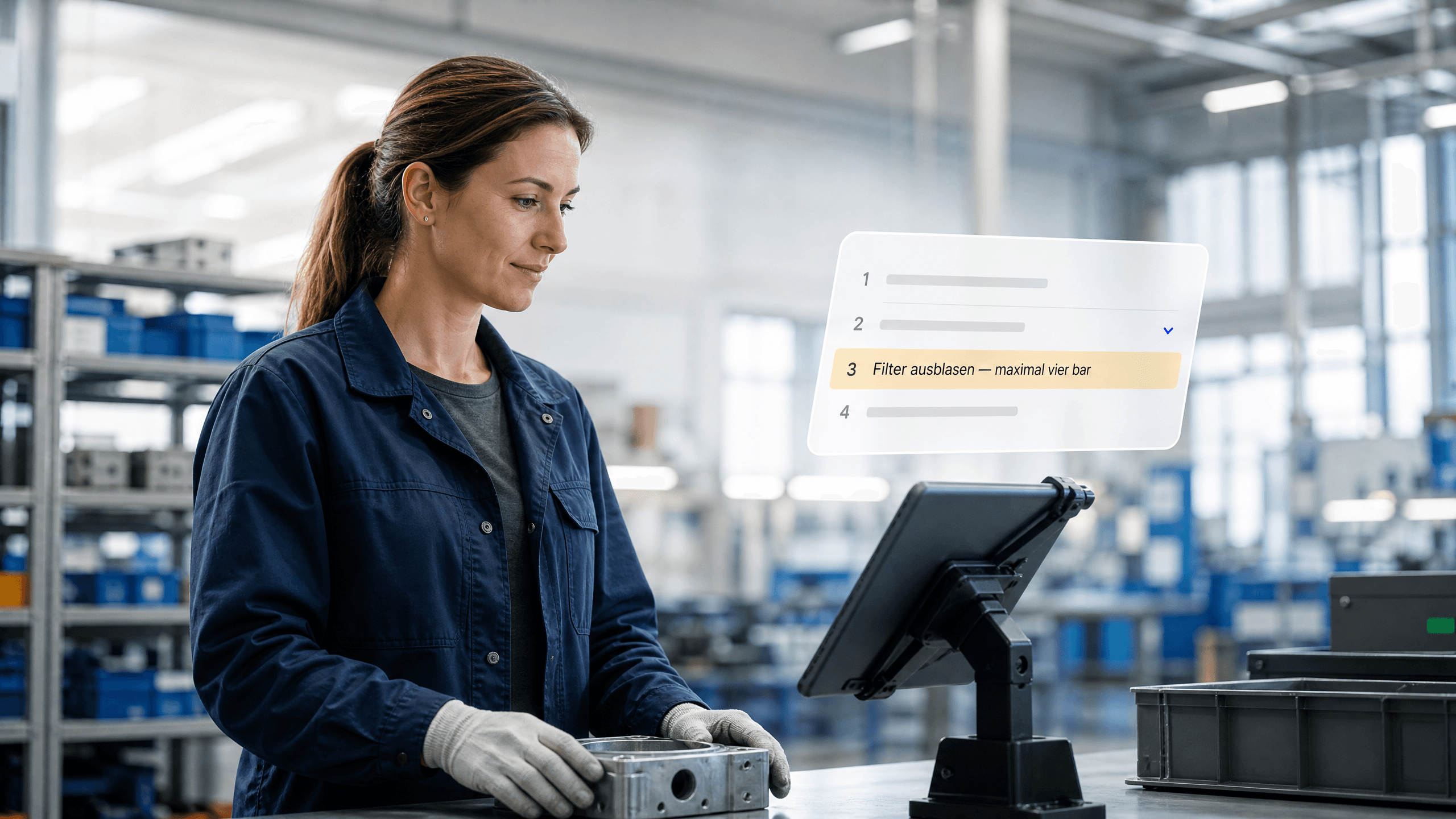
An operator guidance system, also called a worker assistance system, supports employees directly at the workstation while they carry out their task, especially in assembly, picking and inspection. It shows the right information at the right time, guides people step by step through the process and checks or documents whether each step was completed correctly. The term operator guidance describes the same task from the perspective of the person at the workstation: the system guides them through the work.
In a study on digital assistance systems, Fraunhofer IAO distinguishes three types of support (Klapper et al., Fraunhofer IAO 2019, p. 6):
- Sensory: The system supports the senses, for example with light signals during picking or with image processing.
- Cognitive: The system supports decisions by providing information, for example with data visualization or condition monitoring.
- Cognitive-sensory: The system combines both, for example with augmented reality.
Everyday life in many companies shows why the topic is becoming more important: the number of product variants is growing, batch sizes are shrinking, and experienced specialists are retiring. New employees, temporary workers and floaters have to work safely and quickly. An operator guidance system brings knowledge to the workstation instead of relying on it being in everyone's head.
Two terms are often used as synonyms, but they mean something different. The digital work instruction is the content: the step-by-step instruction itself. The operator guidance system is the system that delivers this instruction at the workstation, via screen, projection or light, and checks or documents how it is carried out. The connected worker platform is the broadest term. It includes operator guidance and connects it with training, qualification and communication across many workstations and sites.
Hardware or software: the types
In practice, operator guidance systems differ mainly in how they bring information to the person. Roughly speaking, there are two groups: systems with their own hardware at the workstation, and software that runs on existing devices such as tablets, smartphones or screens.
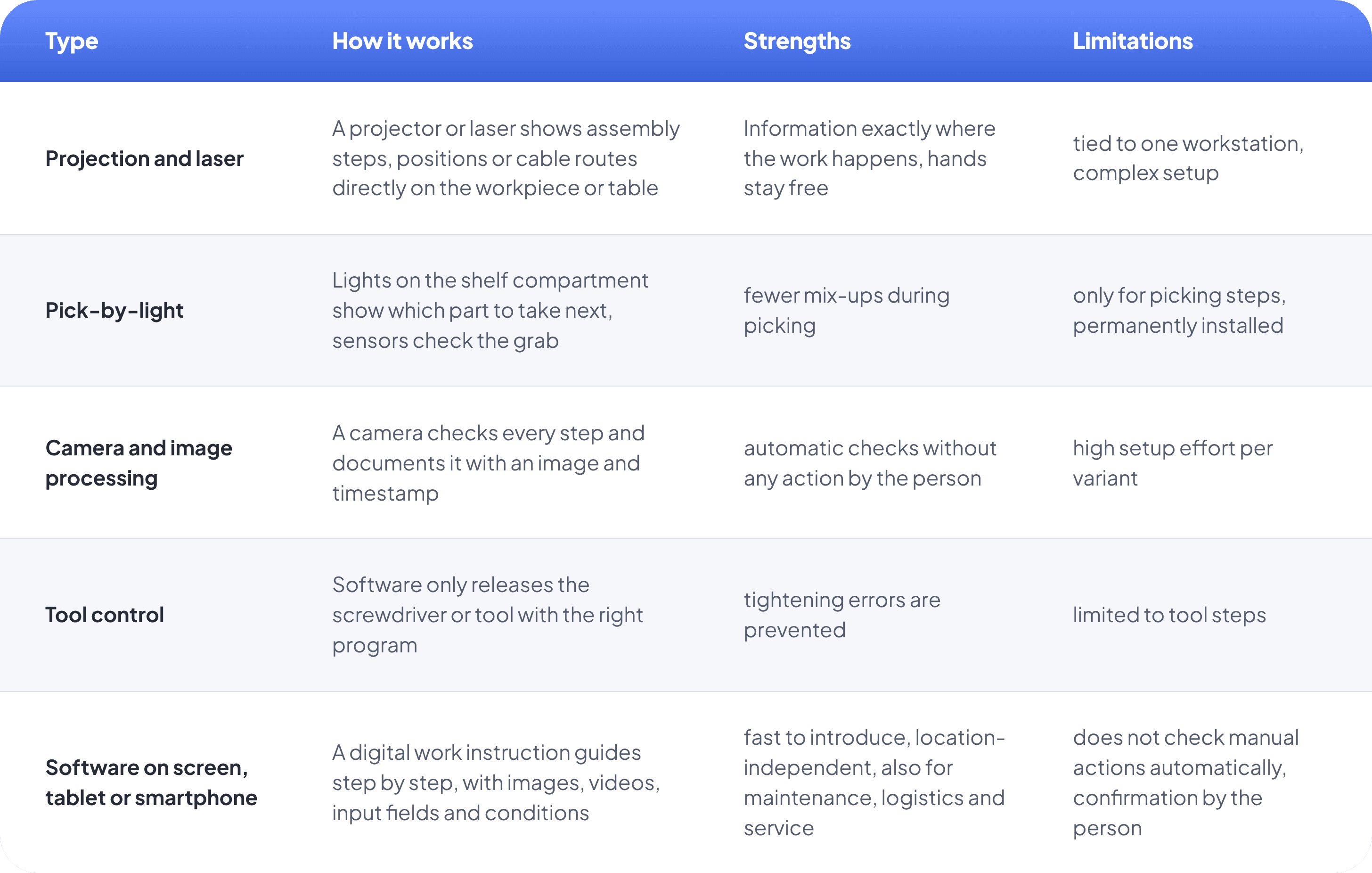
Software is not a smaller version of a projection system. It solves a different problem. Above all, it replaces paper binders, Word and PDF instructions and verbal onboarding by experienced colleagues. What is new is how instructions are created: with AI, a draft with work steps is created in a short time from a video of the task, a PDF or a description in a chat. This means knowledge gets documented even where nobody used to take the time to write an instruction.
Many systems combine several types. An assembly station can, for example, guide via screen, secure part picking with pick-to-light and release the screwdriver via the software.
Which type fits depends mainly on the workstation. At a fixed assembly station with high volumes and high error costs, hardware pays off because it actively prevents errors. Where people change locations, for example in maintenance, in the warehouse or at the customer's site, or where processes change frequently, software on mobile devices is usually the faster and cheaper solution. At an assembly station with many variants, both can make sense: software for step-by-step guidance and projection for wiring routes or positions.
Selection criteria
Before you request quotes, clarify which problem the system should solve first: errors in assembly, long onboarding, missing proof of compliance or knowledge that leaves with experienced colleagues. After that, these criteria help:
- Workstation: A fixed assembly station or changing locations? This determines whether hardware is an option at all.
- Variants and changes: How often do products and processes change? The more often, the more it matters how quickly you can create and update an instruction.
- Creation: Who creates the instructions, and how long does it take? Some systems import data from CAD or ERP, others use AI to create a draft from documents or from a video of the task.
- Inspection and proof: Is confirmation by the person with a measured value, photo and signature enough, or do you need automatic inspection by camera or sensor?
- Integration: Does the system need to take orders from ERP or MES, control tools or report data back?
- Qualification and briefing: Can you prove who has been briefed at which workstation? In Germany, safety briefings are mandatory under Section 12 of the Occupational Safety and Health Act (ArbSchG).
- Languages: Do people with different native languages work at the station? Then translations and images matter.
- Costs: Besides licenses, hardware comes with devices, installation and setup per workstation. Most providers do not publish prices. So use the quote to calculate the effort per workstation and per new variant.
- Works council and data protection: In Germany, cameras and systems that record steps with person and time are generally subject to co-determination under Section 87 (1) No. 6 of the Works Constitution Act (BetrVG). Specify that the data serves quality verification and not performance monitoring, and involve the works council early.
In Germany, the Mittelstand-Digital Zentren also offer support with the selection. By their own account, they help small and medium-sized companies with digitalization free of charge and independently of vendors.
Digital operator guidance on smartphone and tablet
With Elephant, you guide employees step by step through the task, with images and videos at each work step and input fields for measured values, photos and signatures as proof. Try the SOP-Builder free for 14 days.
Providers at a glance
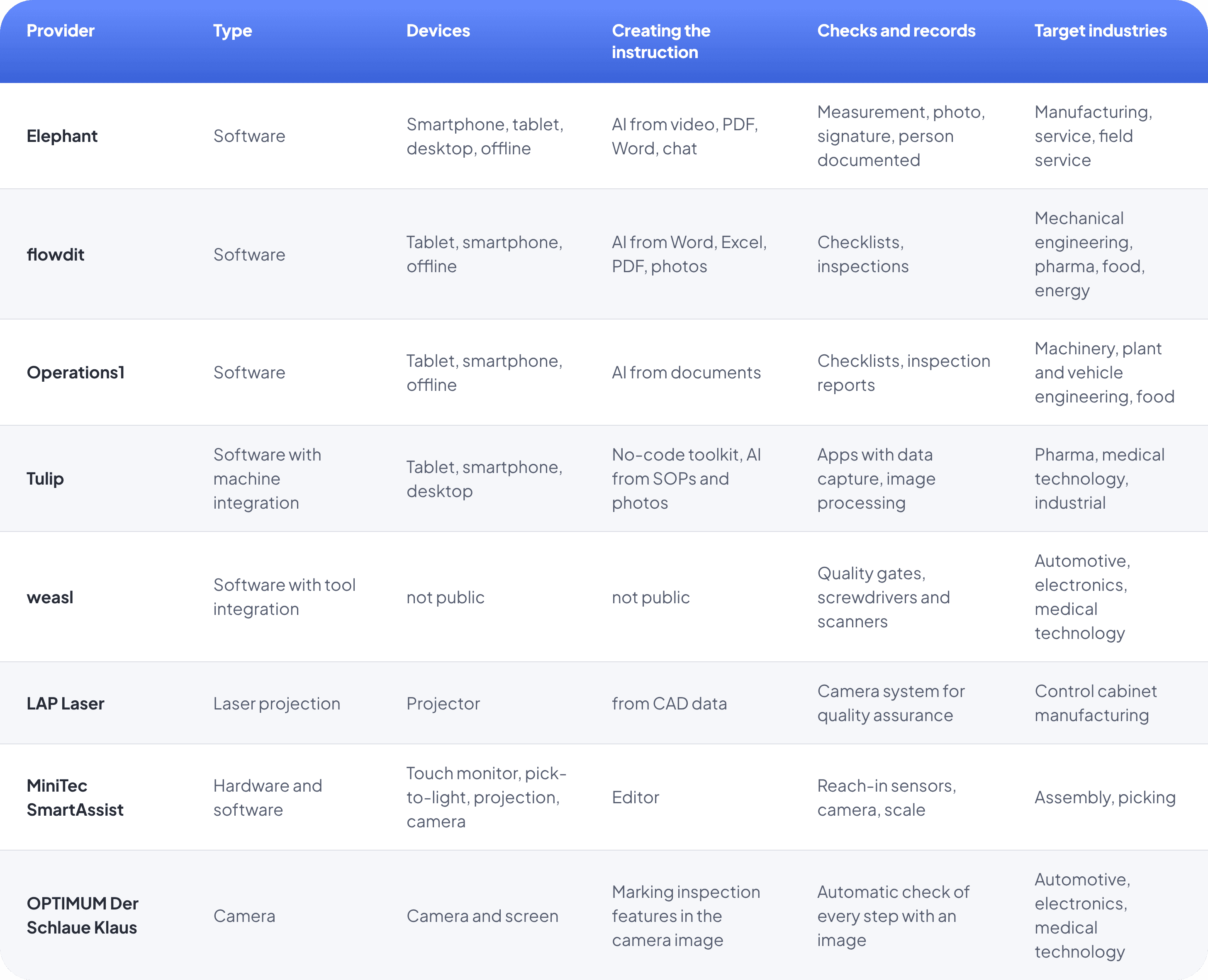
The market for operator guidance is strongly shaped by German mid-sized companies. We present 5 software providers and 3 providers with hardware at the workstation, each in alphabetical order and without ranking.
Software on screen, tablet and smartphone
Elephant guides employees through a task with digital work instructions on smartphone, tablet or desktop, also offline if needed. With the SOP-Builder, you upload a video, a PDF or a Word document or describe the process in a chat, and the AI creates a draft with work steps from it. The instruction contains images and videos at each step, input fields for measured values, photos and signatures, conditions for error cases, repetitions and translations into more than 105 languages. It documents who carried out a changeover or inspection. An instruction can be turned into a course for onboarding. Elephant supports you in selecting and procuring the right hardware for your use case. Employees open the right instruction directly via QR codes on the machine, and completed checklists are saved as reports with person, time and measured values.
flowdit is a no-code platform for inspections, checklists and work instructions on tablet and smartphone, also offline. Its AI creates instructions from Word, Excel, PDF and photos. Target industries include mechanical engineering, pharma, food and energy. A trial version is available, and the website does not list prices.
Operations1 is a connected worker platform for manufacturing with multimedia, multilingual work instructions and checklists, training, quality inspection and maintenance. The app runs on tablet and smartphone, also offline, and connects to SAP, ERP and MES. Its AI converts existing documents into instructions. Prices are available on request.
Tulip is a no-code platform that manufacturers use to build their own apps for operator guidance, quality and analytics, with connectors to machines and ERP. Its AI creates apps from SOPs and photos and uses image processing.
weasl describes itself as software for manual industrial work and guides by variant and qualification, with quality gates. Screwdrivers and scanners are connected via OPC UA and MQTT. weasl runs in the cloud with hosting in Germany or on premises. Target industries are automotive, electronics, medical technology and mechanical engineering.
Hardware at the workstation
LAP Laser projects assembly plans from CAD data by laser directly onto the mounting plate, for example in control cabinet construction for cable ducts, terminal strips and wiring routes. A camera system for quality assurance is also available.
MiniTec SmartAssist is a modular system of software and hardware: editor, touch monitors, pick-to-light with intervention sensors, laser projection, camera and scales. Areas of use are assembly, picking, goods receipt and shipping.
OPTIMUM "Der Schlaue Klaus" checks every assembly step live by camera and documents it with an image and timestamp. Each process is taught once by marking the inspection features in the camera image. Target industries are automotive, electronics, medical technology and mechanical engineering.
In short: Hardware systems actively prevent errors at a fixed assembly station, but tie up time and budget per workstation. Software systems are faster to introduce, also work where people change locations, and rely on proof provided by the person. What matters is which problem you want to solve first. If it is about errors at a fixed station with high volumes, hardware pays off. If it is about onboarding, proof or knowledge that should stay in the company, software is usually the faster start. Both can be combined later.
Capture assembly knowledge in minutes instead of hours
Film an assembly step with your smartphone, and the AI creates a draft with work steps that you review and complete. We will show you in a demo exactly how the SOP-Builder works.